



历史上的今天
今天是:2025年01月17日(星期五)
2019年01月17日 | STM32:STM32库函数配置
2019-01-17 来源:eefocus
stm32 固件库V3.0以上的版本,main等源文件中不再直接包含stm32f10x_conf.h,而是stm32f10x.h,stm32f10x.h则定义了启动设置,以及所有寄存器宏定义,此文件中需要注意的有:使用V3.0以上版本固件库的方法如下:
1.选择device(配置函数STM32F10x.h,具体配置方法如下)
在STM32F10x.h中有如下代码:
#if !defined (STM32F10X_LD) && !defined (STM32F10X_LD_VL) && !defined (STM32F10X_MD) && !defined (STM32F10X_MD_VL) && !defined (STM32F10X_HD) && !defined (STM32F10X_HD_VL) && !defined (STM32F10X_XL) && !defined (STM32F10X_CL)
/* #define STM32F10X_LD */ /*!< STM32F10X_LD: STM32 Low density devices */
/* #define STM32F10X_LD_VL */ /*!< STM32F10X_LD_VL: STM32 Low density Value Line devices */
/* #define STM32F10X_MD */ /*!< STM32F10X_MD: STM32 Medium density devices */
/* #define STM32F10X_MD_VL */ /*!< STM32F10X_MD_VL: STM32 Medium density Value Line devices */
/* #define STM32F10X_HD */ /*!< STM32F10X_HD: STM32 High density devices */
/* #define STM32F10X_HD_VL */ /*!< STM32F10X_HD_VL: STM32 High density value line devices */
/* #define STM32F10X_XL */ /*!< STM32F10X_XL: STM32 XL-density devices */
/* #define STM32F10X_CL */ /*!< STM32F10X_CL: STM32 Connectivity line devices */
#endif
该代码的是让用户根据自己所使用的芯片的存储器(flash)大小,选择相应的flash编程算法,如果用户使用的是大容量存储芯片(如STM32F103VCT6),则只需要将对应大大容量存储器前面的屏蔽符去掉即可,去掉后为:
#define STM32F10X_HD /*!< STM32F10X_HD: STM32 High density devices */
其它部分代码不变。
如果使用的是中等容量的存储器芯片(如stm32f103c8t6),同样是将对应代码前面的屏蔽符去掉即可,如:
#define STM32F10X_MD /*!< STM32F10X_MD: STM32 Medium density devices */
2. 时钟频率配置(配置函数:system_stm32f10x.c,具体配置方法如下:)
#if defined (STM32F10X_LD_VL) || (defined STM32F10X_MD_VL) || (defined STM32F10X_HD_VL)
/* #define SYSCLK_FREQ_HSE HSE_VALUE */
#define SYSCLK_FREQ_24MHz 24000000
#else
/* #define SYSCLK_FREQ_HSE HSE_VALUE */
/* #define SYSCLK_FREQ_24MHz 24000000 */
/* #define SYSCLK_FREQ_36MHz 36000000 */
/* #define SYSCLK_FREQ_48MHz 48000000 */
/* #define SYSCLK_FREQ_56MHz 56000000 */
#define SYSCLK_FREQ_72MHz 72000000
#endif
由上述代码可见默认是使用72MHz的时钟频率,如果需要使用其它频率,只需做相应的修改即可,如果使用的是72MHz时钟频率可以不用配置此项。
3. 选择外部时钟(晶体,由于前面的代买没有取消 /* #define STM32F10X_CL */ /*!< STM32F10X_CL: STM32 Connectivity line devices */的注释,所以此处默认的外部8MHz的晶体。
4. 开启外设总开关USE_STDPERIPH_DRIVER (配置函数:stm32f10x.h,具体配置方法如下:)
#if !defined USE_STDPERIPH_DRIVER
/**
* @brief Comment the line below if you will not use the peripherals drivers.
In this case, these drivers will not be included and the application code will
be based on direct access to peripherals registers
*/
/*#define USE_STDPERIPH_DRIVER*/
#endif
默认情况下STM32的标准是关闭的,如果不适用片内外设,则不要取消 /*#define USE_STDPERIPH_DRIVER*/的注释
,如果需要使用STM32的标准外设则需要开启固件外设,即去掉前面的屏蔽符,修改后如下:
#if !defined USE_STDPERIPH_DRIVER
/**
* @brief Comment the line below if you will not use the peripherals drivers.
In this case, these drivers will not be included and the application code will
be based on direct access to peripherals registers
*/
#define USE_STDPERIPH_DRIVER
#endif
5. 最后一步是开启需要使用的外设(配置函数:stm32f10x_config.h,具体配置步骤如下:)
/* Includes ------------------------------------------------------------------*/
/* Uncomment the line below to enable peripheral header file inclusion */
/* #include "stm32f10x_adc.h" */
/* #include "stm32f10x_bkp.h" */
/* #include "stm32f10x_can.h" */
/* #include "stm32f10x_cec.h" */
/* #include "stm32f10x_crc.h" */
/* #include "stm32f10x_dac.h" */
/* #include "stm32f10x_dbgmcu.h" */
/* #include "stm32f10x_dma.h" */
/*#include "stm32f10x_exti.h" */
/* #include "stm32f10x_flash.h" */
/* #include "stm32f10x_fsmc.h" */
/*#include "stm32f10x_gpio.h" */
/* #include "stm32f10x_i2c.h" */
/* #include "stm32f10x_iwdg.h" */
/* #include "stm32f10x_pwr.h" */
/*#include "stm32f10x_rcc.h" */
/* #include "stm32f10x_rtc.h" */
/* #include "stm32f10x_sdio.h" */
/* #include "stm32f10x_spi.h" */
/* #include "stm32f10x_tim.h" */
/*#include "stm32f10x_usart.h" */
/* #include "stm32f10x_wwdg.h" */
/*#include "misc.h" */ /* High level functions for NVIC and SysTick (add-on to CMSIS functions) */
默认是关闭所有外设的,用户需要使用哪个外设,就将该外设前面的注释去掉即可。
到这里库函数的配置就全部介绍完毕了,建一个工程需要修改这么多配置是不是太麻烦了呢,的确是比较麻烦,最后再给大家介绍一种简单的配置方法,用宏定义配置这些参数,keil MDk 支持在编译器中添加宏定义,这里就以keil MDK为例,给大家介绍。
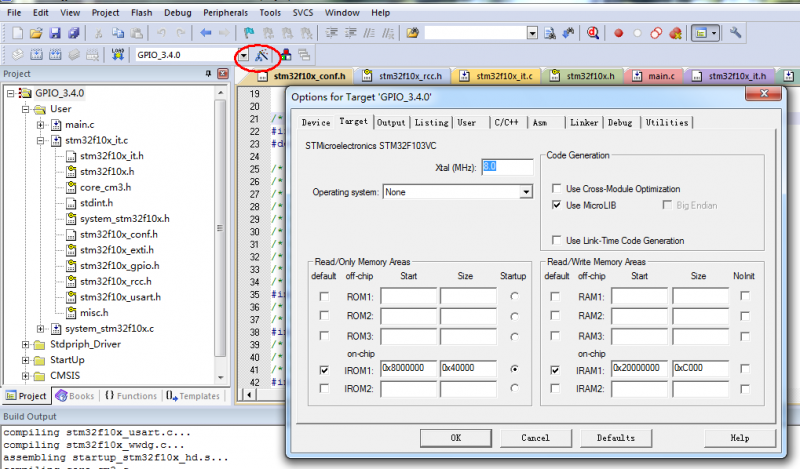
先在keil MDK中点击tagart option选项,弹出如下图所示窗口:
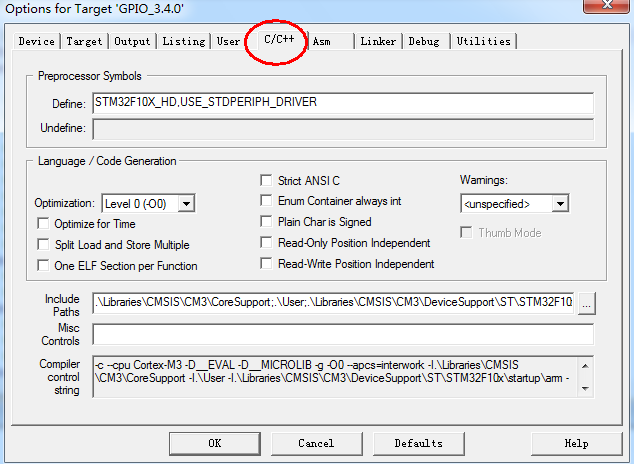
然后点击C/C++选项,弹出如下窗口:
最后在Difine的方框中添加上需要声明的宏定义即可。
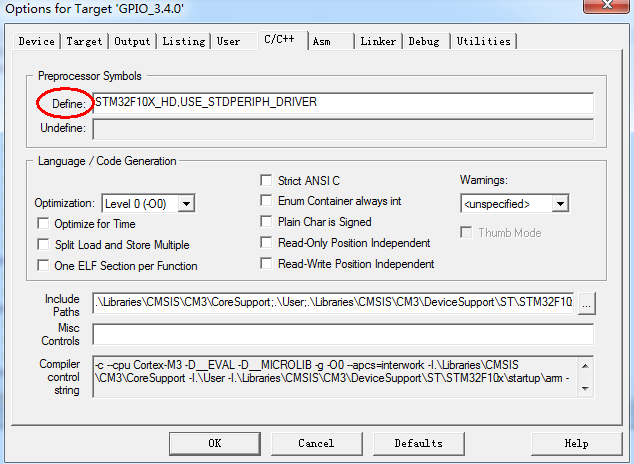
这里总结一下一般工程中需要添加的宏定义:
1. STM32F10X_HD //选择用户所使用芯片的存储器容量(这里选择的是大容量存储)
2. USE_STDPERIPH_DRIVER //打开标准外设总开关
3. SYSCLK_FREQ_72MHz //选择时钟频率(默认也是该选项)
4. HSE_VALUE //选择使用外部高速时钟(默认也是该选项)
注意:stm32f10x.h文件的最后有这样的代码:
#ifdef USE_STDPERIPH_DRIVER
#include "stm32f10x_conf.h"
#endif
stm32f10x_conf.h中包含了所有外设的头文件,因此任意源文件只要包含了stm32f10x.h,就可以在源文件调用任意外设的函数。
若有外设为使用到,在stm32f10x_conf.h注释相应部分,项目编译时就不会在编译去掉的外设。
史海拾趣
|
51汇编语言指令集很多书上有,但是有很多书没有放在一起,每章一部分。还有些朋友有书没带在身边,或是使用过,望了买本书又划不来。把这个传上来方便各位。[ip]… 查看全部问答> |
|
最近打算设计新产品,在Friendly Arm买了一套Matrix5系统研究一下。发现用ARM-Linux开发似乎比较明智些! 但用Windows习惯了,还不太熟悉Linux,而且重装RH9恐怕很费事。还是先用Win2000吧,Linux熟悉熟悉再说! 看见版上有个Cygwin,可以在Windo ...… 查看全部问答> |
|
在手机上开发了一个录音机程序,但在正在录音过程中来电时,录音自动停止,可是写文件出现了错误(WriteFile函数中参数出错)。请问怎么怎样才能解决?谢谢。… 查看全部问答> |
|
是这样的,我想在windows ce上的运行SKYPE程序?哪位兄弟有没有移植好的EXE文件,或者源码呀,能不能给我一份呀?小弟不胜感谢!我的邮箱是sunboyljp@163.com… 查看全部问答> |
|
我的三星2350设备,当我没有装上蓝牙设备的时候 Activesync一起正常,但是当我安装上蓝牙驱动的时候,ActiveSync就很难连接, 而且连接上的情况下,我断开usb连线,系统老是报Error:608的错误。各位帮帮忙,是不是和注册表哪块设置有关? 谢谢… 查看全部问答> |
|
搞硬件的必须知道的东西 新加电平耦合资料,也是必须知道的,是关于LVPECL, VML, CML, and LVDS Levels.PDF [ 本帖最后由 ming1005 于 2010-9-26 09:46 编辑 ]… 查看全部问答> |