



历史上的今天
今天是:2024年12月31日(星期二)

2021年12月31日 | 4412 GPIO读 和 ioremap控制GPIO寄存器
2021-12-31 来源:eefocus
一、配置GPIO读
在视频14的基础上做
1.利用拨码开关来实现GPIO输入
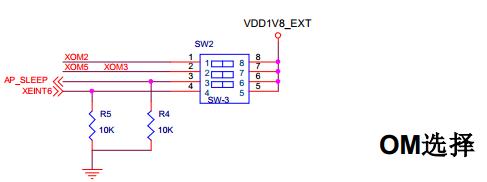


所以AP_SLEEP对应GPC0_3,然后在drivers/gpio/gpio-exynos4.c中对应EXYNOS4_GPC0(0)
XEINT6→GPX0_6→EXYNOS4_GPX0(6)
读寄存器手册分析流程:
设置寄存器为输入 GPC0CON
读寄存器值 GPC0DAT
不上拉,不下拉 GPC0PUD
2.GPIO的输入需要哪些函数,从archarmplat-samsunggpio-config.c中找
申请gpio_request
读寄存器gpio_get_value
设置GPIO为输入模式s3c_gpio_cfgpin S3C_GPIO_INPUT
设置上拉下拉s3c_gpio_setpull S3C_GPIO_PULL_NONE
释放GPIO gpio_free
3.平台文件中设备注册
在文件arch/arm/mach-exynos/mach-itop4412.c中:
struct platform_device s3c_device_read_gpio_ctl = {
.name = "read_gpio_ctl",
.id = -1,
};
&s3c_device_read_gpio_ctl,
在init_lcd_type函数中request了GPIO。所以在get_lcd_type需要释放GPIO
gpio_free(EXYNOS4_GPC0(3));
gpio_free(EXYNOS4_GPX0(6));
4.Makefile修改
Makefile
TARGET_NAME = read_gpio
APP_NAME = app_read_gpio
obj-m += $(TARGET_NAME).o
KDIR := /home/topeet/chen/kernel-3.0/iTop4412_Kernel_3.0
PWD ?= $(shell pwd)
all:app
make -C $(KDIR) M=$(PWD) modules
app:$(APP_NAME)
arm-none-linux-gnueabi-gcc $(APP_NAME).c -o $(APP_NAME) -static
clean:
rm -rf *.o *.ko *.mod.c *.symvers *.order
.$(TARGET_NAME)* $(APP_NAME)
5.驱动的修改
read_gpio.c
#include #include /*驱动注册的头文件,包含驱动的结构体和注册和卸载的函数*/ #include /*注册杂项设备头文件*/ #include /*注册设备节点的文件结构体*/ #include /*Linux中申请GPIO的头文件*/ #include /*三星平台的GPIO配置函数头文件*/ /*三星平台EXYNOS系列平台,GPIO配置参数宏定义头文件*/ #include #include /*三星平台4412平台,GPIO宏定义头文件*/ #include #define DRIVER_NAME "read_gpio_ctl" #define DEVICE_NAME "read_gpio_ctl" MODULE_LICENSE("Dual BSD/GPL"); MODULE_AUTHOR("TOPEET"); static long read_gpio_ioctl( struct file *files, unsigned int cmd, unsigned long arg) { printk("cmd is %d,arg is %dn",cmd,arg); if(cmd > 1){ printk(KERN_EMERG "cmd is 0 or 1n"); } if(arg > 1){ printk(KERN_EMERG "arg is only 1n"); } //if cmd is 0, return GPC(3)>>switch3 //if cmd is 1, return GPX(6)>>switch4 if(cmd == 0) { return gpio_get_value(EXYNOS4_GPC0(3)); } if(cmd == 1) { return gpio_get_value(EXYNOS4_GPX0(6)); } return 0; } static int read_gpio_release(struct inode *inode, struct file *file) { printk(KERN_EMERG "read_gpio releasen"); return 0; } static int read_gpio_open(struct inode *inode, struct file *file) { printk(KERN_EMERG "read_gpio openn"); return 0; } static struct file_operations read_gpio_ops = { .owner = THIS_MODULE, .open = read_gpio_open, .release = read_gpio_release, .unlocked_ioctl = read_gpio_ioctl, }; static struct miscdevice read_gpio_dev = { .minor = MISC_DYNAMIC_MINOR, .name = DEVICE_NAME, .fops = &read_gpio_ops, }; static int read_gpio_probe(struct platform_device *pdv) { int ret; printk(KERN_EMERG "tinitializedn"); ret = gpio_request(EXYNOS4_GPC0(3),"Switch3"); if(ret < 0){ printk(KERN_EMERG "gpio_request EXYNOS4_GPL2(0) failed!n"); return ret; } else { s3c_gpio_cfgpin(EXYNOS4_GPC0(3), S3C_GPIO_INPUT); s3c_gpio_setpull(EXYNOS4_GPC0(3), S3C_GPIO_PULL_NONE); } ret = gpio_request(EXYNOS4_GPX0(6),"Switch4"); if(ret < 0){ printk(KERN_EMERG "gpio_request EXYNOS4_GPL2(0) failed!n"); return ret; } else { s3c_gpio_cfgpin(EXYNOS4_GPX0(6), S3C_GPIO_INPUT); s3c_gpio_setpull(EXYNOS4_GPX0(6), S3C_GPIO_PULL_NONE); } misc_register(&read_gpio_dev); return 0; } static int read_gpio_remove(struct platform_device *pdv) { printk(KERN_EMERG "tremoven"); gpio_free(EXYNOS4_GPC0(3)); gpio_free(EXYNOS4_GPX0(6)); misc_deregister(&read_gpio_dev); return 0; } static void read_gpio_shutdown(struct platform_device *pdv) { ; } static int read_gpio_suspend(struct platform_device *pdv,pm_message_t pmt) { return 0; } static int read_gpio_resume(struct platform_device *pdv) { return 0; } struct platform_driver read_gpio_driver = { .probe = read_gpio_probe, .remove = read_gpio_remove, .shutdown = read_gpio_shutdown, .suspend = read_gpio_suspend, .resume = read_gpio_resume, .driver = { .name = DRIVER_NAME, .owner = THIS_MODULE, } }; static int read_gpio_init(void) { int DriverState; printk(KERN_EMERG "read_gpio enter!n"); DriverState = platform_driver_register(&read_gpio_driver); printk(KERN_EMERG "tDriverState is %dn",DriverState); return 0; } static void read_gpio_exit(void) { printk(KERN_EMERG "read_gpio exit!n"); platform_driver_unregister(&read_gpio_driver); } module_init(read_gpio_init); module_exit(read_gpio_exit); 应用程序: app_read_gpio #include #include #include #include #include #include #include #define GPIOS 32 int main(int argc, char *argv[]) { int fd, i, cmd = 2; char *read_gpio = "/dev/read_gpio_ctl"; char *cmd0 = "0"; char *cmd1 = "1"; printf("argv[0] is %s;argv[1] is %s;n", argv[0], argv[1]); if(strcmp(argv[1], cmd0) == 0) { cmd = 0; } if(strcmp(argv[1], cmd1) == 0) { cmd = 1; } if((fd = open(read_gpio, O_RDWR|O_NDELAY)) < 0) { printf("APP open %s failedn", read_gpio); } else { printf("APP open %s success!n", read_gpio); printf("%d io value is %dn", cmd, ioctl(fd, cmd, 0)); } close(fd); } 测试结果: [root@iTOP-4412]# ./app_read_gpio 1 argv[0] is ./app_[ 312.514145] read_gpio open [ 312.516876] cmd is 1,arg is 0 [ 312.519870] read_gpio release read_gpio;argv[1] is 1; APP open /dev/read_gpio_ctl success! 1 io value is 0 [root@iTOP-4412]# ./app_read_gpio 0 argv[0] is ./app_[ 314.786489] read_gpio open [ 314.789131] cmd is 0,arg is 0 [ 314.792307] read_gpio release read_gpio;argv[1] is 0; APP open /dev/read_gpio_ctl success! 0 io value is 0 [root@iTOP-4412]# ./app_read_gpio 1 argv[0] is ./app_[ 321.786146] read_gpio open [ 321.788790] cmd is 1,arg is 0 [ 321.791899] read_gpio release read_gpio;argv[1] is 1; APP open /dev/read_gpio_ctl success! 1 io value is 1 [root@iTOP-4412]# ./app_read_gpio 0 argv[0] is ./app_[ 323.449833] read_gpio open [ 323.452526] cmd is 0,arg is 0 [ 323.455489] read_gpio release read_gpio;argv[1] is 0; APP open /dev/read_gpio_ctl success! 0 io value is 1 上面使用的是直接通过软件转换好了的,其实内核也是可以自己做转化的。 自己实现物理地址到虚拟地址的转化,iounmap和ioremap函数可以实现物理地址到虚拟地址的转化 原理图部分 datasheet物理地址 GPL2CON = 0x1100 0000 + 0x0100 = 0x1100 0100 GPL2DAT = 0x1100 0000 + 0x0104 = 0x1100 0104 GPL2PUD = 0x1100 0000 + 0x0108 = 0x1100 0108 寄存器不一定是32位的,也有16位或8位的 ioremap_leds.c #include #include #include MODULE_LICENSE("Dual BSD/GPL"); MODULE_AUTHOR("Topeet"); //用于存放虚拟地址和物理地址 volatile unsigned long virt_addr, phys_addr; 二、ioremap控制GPIO寄存器
1.硬件

2.软件
上一篇:4412 并发
下一篇:4412 字符类设备的设备号
史海拾趣
|
本帖最后由 paulhyde 于 2014-9-15 09:18 编辑 using System; using System.Runtime.InteropServices; using System.Drawing.Imaging; using System.Windows.Forms; using System.Drawing; namespace YHhotel.YHhotelWindows //注意这里要 ...… 查看全部问答> |
|
51单片机=====74hc573(锁存器) BY: 飞龙 QQ: 9086074 希望认识更多的单片机开发朋友一起交流 第一次做教程不好多多见谅 BLOG: http://hi.baidu.com/alalmn 1. 烧写程序 2.&n ...… 查看全部问答> |
|
怎样对USB设备的其中一个pipe进行读写操作?谢谢!(VB) 我需要与蓝牙设备通信,通过SetupDiGetClassDevs (Guid由注册表找到),SetupDiEnumDeviceInterfaces ,SetupDiGetDeviceInterfaceDetail 函数查找到DevicePath。但是createfile失败。 我需要对这个设备的其中一个pipe读写。在Path后加上“\\PIPE ...… 查看全部问答> |
|
环境是evc++ SP4 afxmessage里面的参数想用1句话加一个变量来做, 例如,我买个5本书,这里的5就是变化的。 用了一下几种方式都不可以,请教高人帮忙来做, AfxMessageBox(\"我买了\"+CString(number)+\"本书\"); ...… 查看全部问答> |
|
使用简单的三线串口,没有流控,没有数据准备好,也没有终端准备好! 请问怎样解决下面的问题: SIM300C和服务器同时发送数据,SIM300C串口输出的数据是AT命令反馈数据和服务器发送数据夹杂在一起的 ...… 查看全部问答> |
|
注意事项: 1. 红外接口芯片TFDU4100没买到 2. 有源晶振提供一个 交易总价:125元 + 20元(快递费) 淘宝地址: http://item.taobao.com/auction/item_detail.htm?item_num_id=8252057915 详细清单如下: ...… 查看全部问答> |