



历史上的今天
今天是:2025年02月14日(星期五)

2020年02月14日 | 基于全志H3芯片的ARM开发环境搭建
2020-02-14 来源:eefocus
最近买了个友善之臂的NanoPi M1板子,又在网上申请了个NanoPi NEO板子,这两个都是基于全志H3芯片的Crotex-A7四核ARM开发板,两个板子可以共用一套开发环境,本文就以NanoPi NEO为例,简单讲述基于全志H3芯片的ARM开发环境搭建。
1. 安装交叉编译工具
1.1 获取交叉编译工具
在百度网盘中,给出了Nanopi NEO的交叉编译工具:
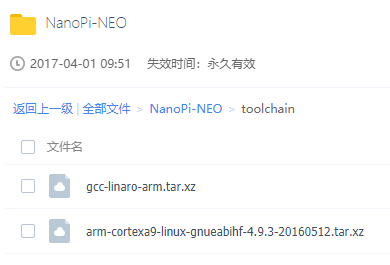
注意:
第一个 gcc-linaro-arm.tar.xz 是用友善之臂给出的脚本编译生成固件的;
如果需要交叉编译工具编译应用程序或者内核,需要使用第二个 arm-cortexa9-linux-gnueabihf-4.9.3-20160512.tar.xz 工具。
1.2 安装交叉编译工具
解压:arm-cortexa9-linux-gnueabihf-4.9.3-20160512.tar.xz,得到 4.9.3 目录,与其他平台搭建交叉编译环境方法一样,将该目录复制到 /usr/local/arm/ 目录下
设置环境变量,在 ~/.bashrc 最后添加:
# vim ~/.bashrc
PATH=$PATH:/usr/local/arm/4.9.3/bin/
export PATH
重启或者注销用户再登录即可使用该交叉编译工具。
1.3 验证安装是否成功
验证交叉编译工具是否安装成功:
$ arm-cortexa9-linux-gnueabihf-gcc -v
Using built-in specs.
COLLECT_GCC=arm-cortexa9-linux-gnueabihf-gcc
COLLECT_LTO_WRAPPER=/usr/local/arm/4.9.3/bin/../libexec/gcc/arm-cortexa9-linux-gnueabihf/4.9.3/lto-wrapper
Target: arm-cortexa9-linux-gnueabihf
Configured with: /work/toolchain/build/src/gcc-4.9.3/configure --build=x86_64-build_pc-linux-gnu --host=x86_64-build_pc-linux-gnu --target=arm-cortexa9-linux-gnueabihf --prefix=/opt/FriendlyARM/toolchain/4.9.3 --with-sysroot=/opt/FriendlyARM/toolchain/4.9.3/arm-cortexa9-linux-gnueabihf/sys-root --enable-languages=c,c++ --with-arch=armv7-a --with-tune=cortex-a9 --with-fpu=vfpv3 --with-float=hard --with-pkgversion=ctng-1.21.0-229g-FA --with-bugurl=http://www.friendlyarm.com/ --enable-__cxa_atexit --disable-libmudflap --disable-libgomp --disable-libssp --disable-libquadmath --disable-libquadmath-support --disable-libsanitizer --with-gmp=/work/toolchain/build/arm-cortexa9-linux-gnueabihf/buildtools --with-mpfr=/work/toolchain/build/arm-cortexa9-linux-gnueabihf/buildtools --with-mpc=/work/toolchain/build/arm-cortexa9-linux-gnueabihf/buildtools --with-isl=/work/toolchain/build/arm-cortexa9-linux-gnueabihf/buildtools --with-cloog=/work/toolchain/build/arm-cortexa9-linux-gnueabihf/buildtools --with-libelf=/work/toolchain/build/arm-cortexa9-linux-gnueabihf/buildtools --enable-lto --with-host-libstdcxx='-static-libgcc -Wl,-Bstatic,-lstdc++,-Bdynamic -lm' --enable-threads=posix --enable-linker-build-id --with-linker-hash-style=gnu --enable-plugin --enable-gold --disable-multilib --with-local-prefix=/opt/FriendlyARM/toolchain/4.9.3/arm-cortexa9-linux-gnueabihf/sys-root --enable-long-long
Thread model: posix
gcc version 4.9.3 (ctng-1.21.0-229g-FA)
1.4 验证交叉编译工具是否能正常编译
验证安装的交叉编译工具编译的程序在Nanopi NEO板子上能够运行:
1)先写一个简单的验证程序,也就是程序员”家喻户晓“的 Hello world!
$ cat hello.c
#include int main(void) { printf("Hello world!n"); return 0; } 2)将程序交叉编译为板子能运行的程序: $ arm-cortexa9-linux-gnueabihf-gcc hello.c -o hello 3)编译完成后生成的hello程序,查看文件属性: $ file hello hello: ELF 32-bit LSB executable, ARM, EABI5 version 1 (SYSV), dynamically linked, interpreter /lib/ld-linux-armhf.so.3, for GNU/Linux 3.0.8, BuildID[sha1]=e471478037c7cf740dadac9ec82136aad38f0c4e, not stripped 2. 将程序通过NFS文件系统复制到开发板 2.1 先让板子连上网 1)确保板子已经能够正常联网: # ifconfig eth0 Link encap:Ethernet HWaddr **:**:**:**:**:** inet addr:***.***.*.*** Bcast:***.***.*.255 Mask:255.255.255.0 inet6 addr: ****::****:****:****:****/64 Scope:Link UP BROADCAST RUNNING MULTICAST MTU:1500 Metric:1 RX packets:820 errors:0 dropped:0 overruns:0 frame:0 TX packets:637 errors:0 dropped:0 overruns:0 carrier:0 collisions:0 txqueuelen:1000 RX bytes:513171 (501.1 KiB) TX bytes:49921 (48.7 KiB) Interrupt:114 lo Link encap:Local Loopback inet addr:127.0.0.1 Mask:255.0.0.0 inet6 addr: ::1/128 Scope:Host UP LOOPBACK RUNNING MTU:16436 Metric:1 RX packets:33 errors:0 dropped:0 overruns:0 frame:0 TX packets:33 errors:0 dropped:0 overruns:0 carrier:0 collisions:0 txqueuelen:0 RX bytes:3304 (3.2 KiB) TX bytes:3304 (3.2 KiB) 2)ping外网,检测是否能和外网通讯: # ping www.baidu.com PING www.baidu.com (163.177.151.110) 56(84) bytes of data. 64 bytes from www.baidu.com (163.177.151.110): icmp_seq=1 ttl=53 time=11.1 ms 64 bytes from www.baidu.com (163.177.151.110): icmp_seq=2 ttl=53 time=10.3 ms 64 bytes from www.baidu.com (163.177.151.110): icmp_seq=3 ttl=53 time=10.6 ms ^C --- www.baidu.com ping statistics --- 3 packets transmitted, 3 received, 0% packet loss, time 2003ms rtt min/avg/max/mdev = 10.356/10.740/11.183/0.350 ms 2.2 安装NFS服务器并配置NFS目录 1)安装NFS服务器 # sudo apt-get install nfs-kernel-server 2)创建NFS目录: # vim /etc/exports 添加: /mnt *(rw,sync,no_root_squash,no_subtree_check) 3)重启NFS服务器: # systemctl restart nfs-kernel-server 4)检查nfs是否启动: # ps -aux | grep nfs root 39 0.0 0.0 0 0 ? S< 14:53 0:00 [nfsiod] root 29118 0.0 0.0 0 0 ? S 15:55 0:00 [nfsd] root 29119 0.0 0.0 0 0 ? S 15:55 0:00 [nfsd] root 29120 0.0 0.0 0 0 ? S 15:55 0:00 [nfsd] root 29121 0.0 0.0 0 0 ? S 15:55 0:00 [nfsd] root 29122 0.0 0.0 0 0 ? S 15:55 0:00 [nfsd] root 29123 0.0 0.0 0 0 ? S 15:55 0:00 [nfsd] root 29124 0.0 0.0 0 0 ? S 15:55 0:00 [nfsd] root 29125 0.0 0.0 0 0 ? S 15:55 0:00 [nfsd] root 29142 0.0 0.1 4136 748 ttyS0 S+ 15:56 0:00 grep nfs 2.3 通过NFS网络服务器传输文件 通过NFS网络服务器挂载,将文件拷贝到板子上: 1)在PC的虚拟机上安装NFS客户端: $ sudo apt-get install nfs-common 2)将板子的 /mnt/nfs 目录挂载到PC虚拟机的 /mnt 目录: $ sudo mount -t nfs -o intr,nolock 192.168.4.113:/mnt/nfs /mnt 3)将PC虚拟机上编译好的程序拷贝到板子上: $ sudo cp hello /mnt 在板子上的/mnt/nfs目录下就可以看到拷贝过来的程序了: # ls /mnt hello 在开发板上运行程序,验证程序是否可以在板子上运行: # ./hello Hello world! 验证成功,由交叉编译工具编译的程序在板子上可以正常运行。 至此,基于全志H3芯片的开发环境搭建完成,可以进行开发工作了。
史海拾趣
|
作为一种新的光源,近年来各大公司和研究机构对LED电源和驱动电路的研究方兴未艾。与荧光灯的电子镇流器不同,LED驱动电路的主要功能是将交流电压转换为直流电压,并同时完成与LED的电压和电流的匹配。随着硅集成电路电源电压的直线下降,LED工作电 ...… 查看全部问答> |
|
本人目前在做毕业论文,里面要用ST与Zigbee通信,因为我是学机械的,又是新接触STM32,所以很多地方都不懂,不过硬件方面已经解决了,主要是程序方面一窍不通,各位大神能不能给个大概思路啊?比如说我就不知道我到底是用SPI呢,还是USART还是GPIO, ...… 查看全部问答> |
|
我最近做激光器的驱动电路,有一个自动功率控制电路这里有一些问题不明白,PD是提供了电流,可是PD的电流方向是向下的,A1运放“+”输入端电流又进不去,那这个方向的电流到底流到哪里呀,这里“+”端又没有接地,电流走不通呀,小弟不明白呀,请各 ...… 查看全部问答> |
|
分享我收集的嵌入式wince/android/linux著名网站和博客地址 3001、android 著名博客 http://blog.csdn.net/Luoshengyang/ ——老罗的android 之旅,一个android大牛人的博客,文章高深莫测,只有少数前期文章适合初学者。 http://blog.csdn.net/mr_raptor ——华清远见一个老师的博客,适合android入门初学 ...… 查看全部问答> |
|
才接触c2000不久,想在程序中采集一些数据存储起来,希望掉电后不丢失,用的f28027,是不是需要i2c外接一个eeprom才行呢,不知道这个片子有没有自带的存储,或者什么方法解决, ...… 查看全部问答> |
|
MSP430F169 P54 输出1之后自动清零是怎么回事? 现在用P54.其片内功能是MCLK的输出,现在设置其为输出,选择为IO功能,可是在置一之后会自动清零。(P5DIR|=BIT4;P5SEL&=~BIT4,P5OUT|=BIT4;)??why?… 查看全部问答> |
|
nxp的芯片我一直都是直接操作寄存器的,带库的是第一次用。还是蛮有新鲜感的。 首先来展示下例程资源 这是最新的版本,有基于LPCXpresso、keil和IAR的。 比较特别的,是当你打开例程中的一个工程,你会发现里面居然集成了很多例程。 当打 ...… 查看全部问答> |