



历史上的今天
今天是:2025年01月07日(星期二)
2020年01月07日 | IAR cortex-M3 +ucos-III问题集
2020-01-07 来源:eefocus
移植:IAR cortex-M3 +ucos-III 时遇到的一些问题,归根到底是编译器不是很熟悉,这里记录下....
下载方式:
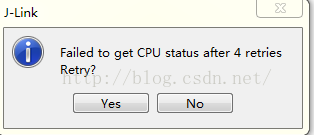
IAR设置的下载链接方式 与 板子的实际环境不统一,同样报错:"Failed to get CPU status after 4 retries retry?"
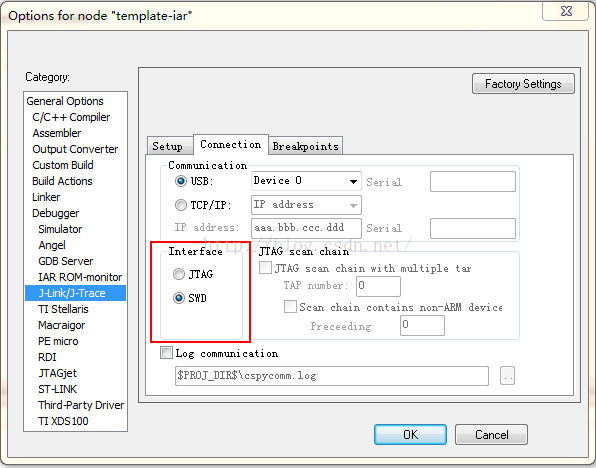
我的板子下载接口SWD方式,对应的IAR设置如下:
新建的IAR工程,莫名进入App_Fault_ISR异常处理程序:
之前移植的ucos-III,带着ST的V3.5库,稍微动一些代码,就会进入App_Fault_ISR,然那些代码与内存数据结构并无关系,着实郁闷。。。
多方比对,调试+++,定位到IAR设置问题。最后找到options-Debugger-download这块。
常规设置如下:
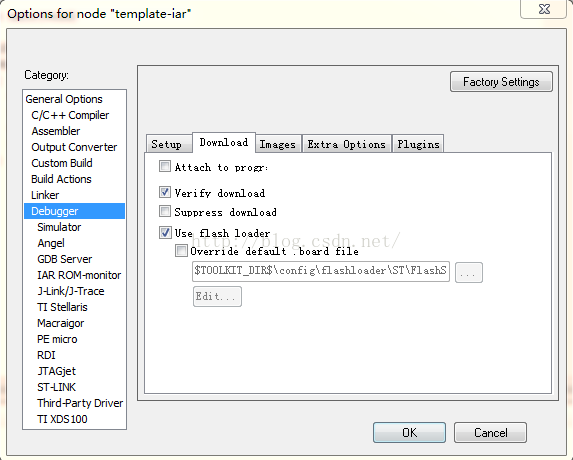
试着理解下这几项的含义,跑偏勿怪。。。
Attach to program:
"Makes the debugger attach to a running application at its current location, without resetting or halting (for J-Link only) the target system. To avoid unexpected behavior when using this option, the Debugger>Setup option Run to should be deselected. "
附加到程序:使调试器附加到一个正在运行的应用程序在其当前位置,无需重置或停止(仅供J-Link)目标系统。为了避免意想不到的行为,当使用此选项时,Debugger>Setup option "Run to" 应该去掉。
Verify download:
"Verifies that the downloaded code image can be read back from target memory with the correct contents"
验证下载:验证下载的代码映像可以从目标内存中读取正确的内容
Suppress download:
"Disables the downloading of code, while preserving the present content of the flash. This command is useful if you want to debug an application that already resides in target memory.
If this option is combined with the Verify download option, the debugger will read back the code image from non-volatile memory and verify that it is identical to the debugged application.
Note: It is important that the image that resides in target memory is linked consistently with how you use C-SPY for debugging. This applies, for example, if you first link your application using an output format without debug information, such as Intel-hex, and then load the application separately from C-SPY. If you then use C-SPY only for debugging without downloading, you cannot build the debugged application with any of the options Semihosted or IAR breakpoint—on the General Options>Library Configuration page—as that would add extra code, resulting in two different code images."
抑制下载:禁用下载代码,同时保留目前的flash内容。这个命令是有用的,如果您想要调试一个应用程序,该应用程序已经在目标内存驻留。
如果这个选项结合验证下载选项,调试器会读回代码映像从非易失性内存,并验证它是与被调试的应用程序相同。
注意:It is important that the image that resides in target memory is linked consistently with how you use C-SPY for debugging.
例如,如果你第一次联系您的应用程序使用一个没有调试信息输出格式,如Intel-hex,,则 C-SPY与加载应用程序分开的。
如果你然后使用C-SPY只有调试没有下载,你不能用任何构建调试应用程序关于Semihosted选项或IAR断点,在the General Options>Library Configuration 页,添加额外的代码,从而导致两种不同的图片代码。
Use flash loader(s) :
"Use this option to use one or several flash loaders for downloading your application to flash memory. If a flash loader is available for the selected chip, it is used by default. Press the Edit button to display the Flash Loader Overview dialog box."
使用flash加载程序:使用这个选项使用一个或多个闪存flash应用程序加载器下载。如果一个flash加载程序可供选择的芯片,在默认情况下使用它。按下编辑按钮对话框显示Flash加载程序概述。
关于IAR的设置,推荐关键字--”IAR EWARM项目选项常用设置“
关于'CSTACK':(stack)栈指针
IAR中debug程序,断点位置会提示:"Tue Dec 15, 2015 14:06:55: The stack pointer for stack 'CSTACK' (currently 0x2000161C) is outside the stack range (0x20002878 to 0x20003078) " ,这很正常。
网友给出的解释:
应用程序启动时要有一个堆栈,不管是裸机,还是基于uCOS,,那就是CSTACK堆栈uCOS-III运行起来后,每个任务有自己的堆栈,所以,当任务运行的时候,IAR编译器会识别到堆栈指针不在CSTACK之内,所以会报The stack pointer for stack 'CSTACK' (currently 0x20007A1C) is outside the stack range (0x20008B88 to 0x20009B88) 这个不是问题,是正常的,,当然,uCOS-III官方移植中,中断堆栈也是独立的,专门用于处理中断,这个好处就是:每个任务堆栈不必考虑中断嵌套层数,从而不用为中断嵌套增加堆栈大小。所以执行中断程序时,也会报The stack pointer for stack 'CSTACK' (currently 0x20007A1C) is outside the stack range (0x20008B88 to 0x20009B88) CSTACK只是在系统启动时使用,之后就没用了,所以可以配置的小一点,以免造成太大的浪费。
下一篇:cortex-M3粗略延时计算
史海拾趣
|
请问高手:如图,我这样连接的显示电路错没? 老师说RXD不能输出,TXD不能作为74LS164的CLOCK信号, 还有第2个164的A.B不能接上一组164输出的的信号,要我改....我真的郁闷了 请高手指教....速度啊...紧急...… 查看全部问答> |
|
在BOOTLOADER中把NK下载到NOR FLASH中,现在想把写入得数据打印出来该怎么做,可以直接访问FLASH的地址吗,我试了下发现读不出来,(全是0),还是要写了类似驱动的东西… 查看全部问答> |
|
新手,询问pda与远程的数据库(oracle)同步问题,急!!! 原来没有做过嵌入式的开发,现在想在pda下做二次开发,系统是wince的,pda上的数据需要跟远程服务器的数据库做数据同步,远程的数据库为oracle,系统为b/s结构的,pda需要连接到pc机上在做同步,pc机可以连接系统,请教思路或者是有什么资料,万分 ...… 查看全部问答> |
|
常用集成电路引脚识别:各种不同的集成电路引脚有不同的识别标记和不同的识别方法,掌握这些标记及识 别方法,对于使用、选购、维修测试是极为重要的。⒈缺口 在IC的一端有一半圆形或方形的缺口。⒉凹坑 色点或金属片 在IC一角有一凹坑、色 ...… 查看全部问答> |