



STM32在Linux系统下的开发方案
2025-10-29 来源:bilibili
在Windows下,所需软件为MDK-ARM和STLINK驱动;在Linux下,则是开源stlink工具和ARM-GCC工具链,以及VSCode。
cut-off
以Kubuntu为例:
安装ARM-GCC工具链:
sudo apt install gcc-arm-none-eabi
安装VSCode:
选择deb安装包,下载并安装
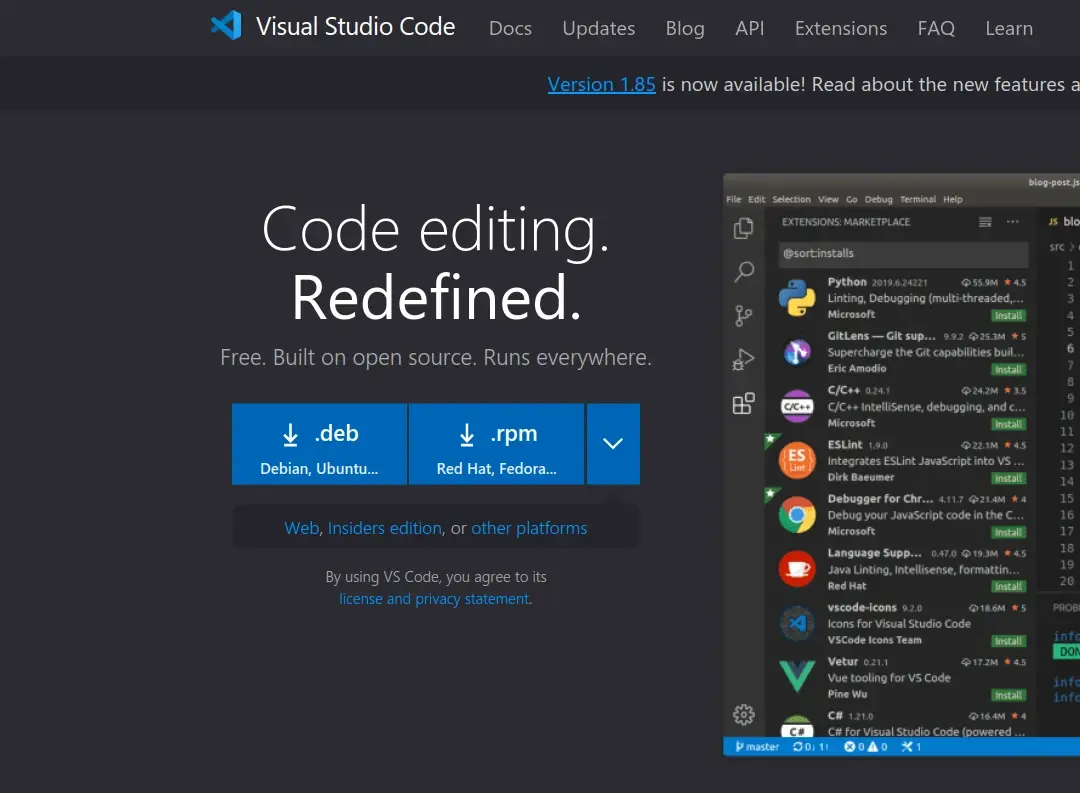
https://code.visualstudio.com/
安装ST-Link工具:
选择最新版本,下载deb安装包并安装

https://github.com/stlink-org/stlink
安装完成后,由于快捷方式文件配置信息有错误,不能启动,需要手动修改,在/usr/share/applications打开终端:
kate stlink-gui.desktop
修改为以下内容,并保存:
[Desktop Entry]
Name=stlink
GenericName=Stlink Tools
Comment=Open source STM32 MCU programming toolset
Exec=stlink-gui
Path=/usr/share/stlink
Icon=stlink-gui
Terminal=false
Type=Application
Categories=Development;Electronics;
这次再点击stlink图标,发现可以启动了:
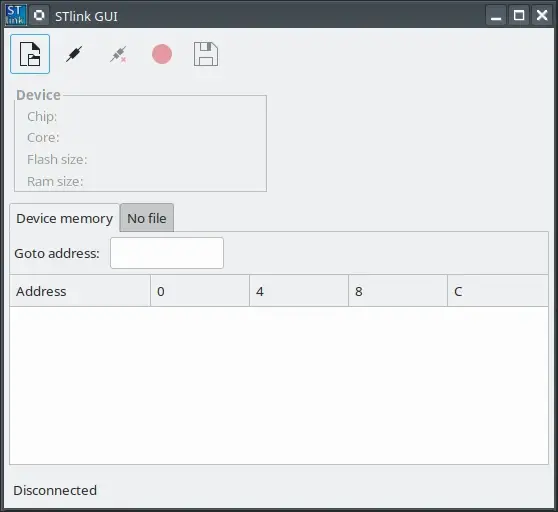
接下来是创建工程,以正点原子阿波罗STM32F429开发板为例:
mkdir arch arch/CMSIS bsp module src
touch Makefile stm32_flash.ld stm32_sram.ld
Makefile:
根据需要,修改ld文件和float_abi(soft/softfp/hard),文件位置
#-------------------------------------------------------------------------------
# File : Makefile
# This file is compiling ARM Cortex-M project.
#
# Change Logs:
# Date Author Notes
# 2021-08-04 LinuxLife the first version
#-------------------------------------------------------------------------------
#---------------------------------------
# Compile option
#---------------------------------------
toolchain := arm-none-eabi-
target := stm32f429
CC := $(toolchain)gcc
AS := $(toolchain)as
LD := $(toolchain)ld
OBJCOPY := $(toolchain)objcopy
OBJDUMP := $(toolchain)objdump
SIZE := $(toolchain)size
archive := cortex-m4
float_abi := soft
fpu := vfpv4
CC_CONFIG := -mcpu=$(archive) -mthumb -mfpu=$(fpu) -mfloat-abi=$(float_abi) -O0 -Ic -Igcc -ffunction-sections -fdata-sections
AS_CONFIG := -mcpu=$(archive) -mthumb -mfpu=$(fpu) -mfloat-abi=$(float_abi) -W -mimplicit-it=thumb
LD_CONFIG := -T stm32_flash.ld --gc-sections
#---------------------------------------
# source path
#---------------------------------------
INCDIRS := arch
arch/CMSIS
bsp
module/STM32F4xx_StdPeriph_Driver
module/STM32F4xx_StdPeriph_Driver/inc
src
SRCDIRS := arch
arch/CMSIS
bsp
module/STM32F4xx_StdPeriph_Driver/src
src
LIBDIRS :=
#---------------------------------------
# get source file
#---------------------------------------
INCLUDE := $(patsubst %, -I %, $(INCDIRS))
# get file
SFILES := $(foreach dir, $(SRCDIRS), $(wildcard $(dir)/*.s))
ASMFILES := $(foreach dir, $(SRCDIRS), $(wildcard $(dir)/*.asm))
CFILES := $(foreach dir, $(SRCDIRS), $(wildcard $(dir)/*.c))
LIBFILES := $(foreach dir, $(LIBDIRS), $(wildcard $(dir)/*.a))
# get file path
SFILENDIR := $(notdir $(SFILES))
ASMFILENDIR := $(notdir $(ASMFILES))
CFILENDIR := $(notdir $(CFILES))
LIBFILENDIR := $(notdir $(LIBFILES))
# get object file
SOBJS := $(patsubst %, %, $(SFILENDIR:.s=.o))
ASMOBJS := $(patsubst %, %, $(ASMFILENDIR:.asm=.o))
COBJS := $(patsubst %, %, $(CFILENDIR:.c=.o))
OBJS := $(SOBJS) $(COBJS) $(ASMOBJS)
VPATH := $(SRCDIRS)
.PHONY: clean
#---------------------------------------
# start compiling
#---------------------------------------
$(target).bin : $(OBJS)
$(LD) $(LD_CONFIG) -o $(target).elf $^ $(LIBFILES)
$(OBJCOPY) -O binary -S $(target).elf $@
$(OBJDUMP) -D -m armv7 $(target).elf > $(target).dis
$(SIZE) -d $(target).elf
$(SOBJS) : %.o : %.s
$(AS) $(AS_CONFIG) -o $@ $<
$(ASMOBJS) : %.o : %.asm
$(AS) $(AS_CONFIG) -o $@ $<
$(COBJS) : %.o : %.c
$(CC) $(CC_CONFIG) $(INCLUDE) -c -o $@ $<
#---------------------------------------
# clean object file
#---------------------------------------
clean:
rm *.elf *.dis *.bin *.o
ROM和RAM链接文件,使程序分别在两种存储中运行,前者用于正式产品中,后者用于调试,延长flash使用寿命,根据需要修改地址和容量即可,同时编译时可以检测程序是否过大:
/*
* file :stm32_flash.ld
*
* abstract :Linker script for STM32 Device
* Set heap size, stack size and stack location according to
* application requirements.
* Set memory bank area and size if external memory is used.
*
* environment:arm-none-eabi-
*/
/* Entry Point */
ENTRY(Reset_Handler)
/* Highest address of the user mode stack */
_estack = 0x2001C000; /* end of RAM */
/* Generate a link error if heap and stack don't fit into RAM */
_Min_Heap_Size = 0; /* required amount of heap */
_Min_Stack_Size = 0x800; /* required amount of stack */
/* Specify the memory areas */
MEMORY
{
FLASH (rx) : ORIGIN = 0x08000000, LENGTH = 1024K
RAM (xrw) : ORIGIN = 0x20000000, LENGTH = 192K
MEMORY_B1 (rx) : ORIGIN = 0x60000000, LENGTH = 0K
}
/* Define output sections */
SECTIONS
{
/* The startup code goes first into FLASH */
.isr_vector :
{
. = ALIGN(4);
KEEP(*(.isr_vector)) /* Startup code */
. = ALIGN(4);
} >FLASH
/* The program code and other data goes into FLASH */
.text :
{
. = ALIGN(4);
*(.text) /* .text sections (code) */
*(.text*) /* .text* sections (code) */
*(.rodata) /* .rodata sections (constants, strings, etc.) */
*(.rodata*) /* .rodata* sections (constants, strings, etc.) */
*(.glue_7) /* glue arm to thumb code */
*(.glue_7t) /* glue thumb to arm code */
KEEP (*(.init))
KEEP (*(.fini))
. = ALIGN(4);
_etext = .; /* define a global symbols at end of code */
} >FLASH
.ARM.extab : { *(.ARM.extab* .gnu.linkonce.armextab.*) } >FLASH
.ARM : {
__exidx_start = .;
*(.ARM.exidx*)
__exidx_end = .;
} >FLASH
.ARM.attributes : { *(.ARM.attributes) } > FLASH
/* used by the startup to initialize data */
_sidata = .;
/* Initialized data sections goes into RAM, load LMA copy after code */
.data : AT ( _sidata )
{
. = ALIGN(4);
_sdata = .; /* create a global symbol at data start */
*(.data) /* .data sections */
*(.data*) /* .data* sections */
. = ALIGN(4);
_edata = .; /* define a global symbol at data end */
} >RAM
/* Uninitialized data section */
. = ALIGN(4);
.bss :
{
/* This is used by the startup in order to initialize the .bss secion */
_sbss = .; /* define a global symbol at bss start */
__bss_start__ = _sbss;
*(.bss)
*(.bss*)
*(COMMON)
. = ALIGN(4);
_ebss = .; /* define a global symbol at bss end */
__bss_end__ = _ebss;
} >RAM
PROVIDE ( end = _ebss );
PROVIDE ( _end = _ebss );
/* User_heap_stack section, used to check that there is enough RAM left */
._user_heap_stack :
{
. = ALIGN(4);
. = . + _Min_Heap_Size;
. = . + _Min_Stack_Size;
. = ALIGN(4);
} >RAM
/* MEMORY_bank1 section, code must be located here explicitly */
/* Example: extern int foo(void) __attribute__ ((section (".mb1text"))); */
.memory_b1_text :
{
*(.mb1text) /* .mb1text sections (code) */
*(.mb1text*) /* .mb1text* sections (code) */
*(.mb1rodata) /* read-only data (constants) */
*(.mb1rodata*)
} >MEMORY_B1
/* Remove information from the standard libraries */
/DISCARD/ :
{
}
}
/*
* file :stm32_sram.ld
*
* abstract :Linker script for STM32 Device
* Set heap size, stack size and stack location according to
* application requirements.
* Set memory bank area and size if external memory is used.
*
* environment:arm-none-eabi-
*/
/* Entry Point */
ENTRY(Reset_Handler)
/* Highest address of the user mode stack */
_estack = 0x2001C000; /* end of RAM */
/* Generate a link error if heap and stack don't fit into RAM */
_Min_Heap_Size = 0x1000; /* required amount of heap */
_Min_Stack_Size = 0x1000; /* required amount of stack */
/* Specify the memory areas */
MEMORY
{
FLASH (rx) : ORIGIN = 0x20000000, LENGTH = 64K
RAM (xrw) : ORIGIN = 0x20010000, LENGTH = 48K
MEMORY_B1 (rx) : ORIGIN = 0x60000000, LENGTH = 0K
}
/* Define output sections */
SECTIONS
{
/* The startup code goes first into FLASH */
.isr_vector :
{
. = ALIGN(4);
KEEP(*(.isr_vector)) /* Startup code */
. = ALIGN(4);
} >FLASH
/* The program code and other data goes into FLASH */
.text :
{
. = ALIGN(4);
*(.text) /* .text sections (code) */
*(.text*) /* .text* sections (code) */
*(.rodata) /* .rodata sections (constants, strings, etc.) */
*(.rodata*) /* .rodata* sections (constants, strings, etc.) */
*(.glue_7) /* glue arm to thumb code */
*(.glue_7t) /* glue thumb to arm code */
KEEP (*(.init))
KEEP (*(.fini))
. = ALIGN(4);
_etext = .; /* define a global symbols at end of code */
} >FLASH
.ARM.extab : { *(.ARM.extab* .gnu.linkonce.armextab.*) } >FLASH
.ARM : {
__exidx_start = .;
*(.ARM.exidx*)
__exidx_end = .;
} >FLASH
.ARM.attributes : { *(.ARM.attributes) } > FLASH
/* used by the startup to initialize data */
_sidata = .;
/* Initialized data sections goes into RAM, load LMA copy after code */
.data : AT ( _sidata )
{
. = ALIGN(4);
_sdata = .; /* create a global symbol at data start */
*(.data) /* .data sections */
*(.data*) /* .data* sections */
. = ALIGN(4);
_edata = .; /* define a global symbol at data end */
} >RAM
/* Uninitialized data section */
. = ALIGN(4);
.bss :
{
/* This is used by the startup in order to initialize the .bss secion */
_sbss = .; /* define a global symbol at bss start */
__bss_start__ = _sbss;
*(.bss)
*(.bss*)
*(COMMON)
. = ALIGN(4);
_ebss = .; /* define a global symbol at bss end */
__bss_end__ = _ebss;
} >RAM
PROVIDE ( end = _ebss );
PROVIDE ( _end = _ebss );
/* User_heap_stack section, used to check that there is enough RAM left */
._user_heap_stack :
{
. = ALIGN(4);
. = . + _Min_Heap_Size;
. = . + _Min_Stack_Size;
. = ALIGN(4);
} >RAM
/* MEMORY_bank1 section, code must be located here explicitly */
/* Example: extern int foo(void) __attribute__ ((section (".mb1text"))); */
.memory_b1_text :
{
*(.mb1text) /* .mb1text sections (code) */
*(.mb1text*) /* .mb1text* sections (code) */
*(.mb1rodata) /* read-only data (constants) */
*(.mb1rodata*)
} >MEMORY_B1
/* Remove information from the standard libraries */
/DISCARD/ :
{
}
}
arch文件夹下的bitband.h
/*
File: bitband.h
cortex-m bit band defines
Change Logs:
Date Author Notes
2021-08-04 LinuxLife the first version
*/
#ifndef __bitband_h__
#define __bitband_h__
#include"stm32f4xx.h"
#define MEM_WR(ADDRESS) *((__IO uint32_t *)ADDRESS)
#define BITBAND(ADDRESS, BIT)
MEM_WR(
(
(ADDRESS & 0xF0000000) + 0x2000000 +
((ADDRESS & 0xFFFFF) << 5) +
(BIT << 2)
)
)
#endif
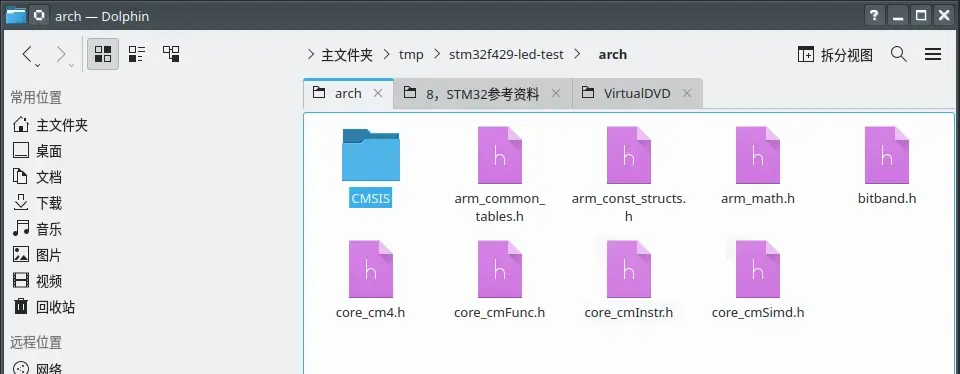
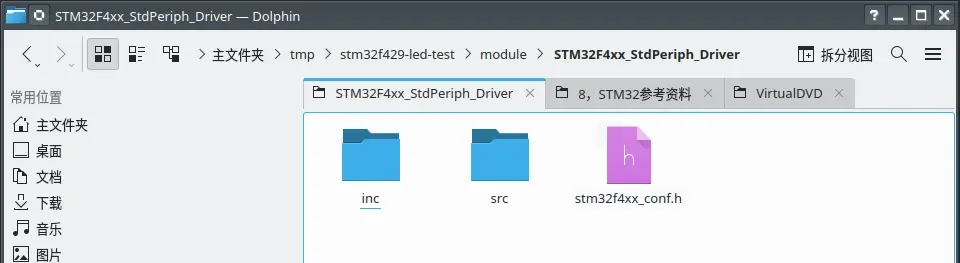
接下来是复制固件库的文件,所需文件如下:
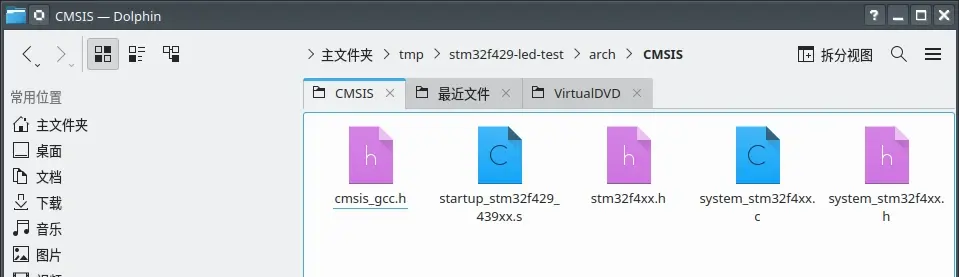
注意一下,使用GCC编译器的,startup汇编代码文件必须选gcc_ride7里的
不然会报错,或者不运行
在bsp文件夹创建文件:
touch bsp.c bsp.h dev_led.c dev_led.h dev_systick.c dev_systick.h
在main文件夹:
touch main.c
#include"bsp.h"
void bsp_init(void)
{
dev_led_init();
}
#ifndef __bsp_h__
#define __bsp_h__
#include"stm32f4xx.h"
#include"dev_systick.h"
#include"dev_led.h"
void bsp_init(void);
#endif
#include"dev_led.h"
void dev_led_init(void)
{
GPIO_InitTypeDef GPIO_InitStruct;
RCC_AHB1PeriphClockCmd(RCC_AHB1Periph_GPIOB, ENABLE);
GPIO_InitStruct.GPIO_Pin = GPIO_Pin_0 |
GPIO_Pin_1;
GPIO_InitStruct.GPIO_Mode = GPIO_Mode_OUT;
GPIO_InitStruct.GPIO_OType = GPIO_OType_PP;
GPIO_InitStruct.GPIO_PuPd = GPIO_PuPd_UP;
GPIO_InitStruct.GPIO_Speed = GPIO_Speed_2MHz;
GPIO_Init(GPIOB, &GPIO_InitStruct);
}
#ifndef __dev_led_h__
#define __dev_led_h__
#include"stm32f4xx.h"
#include"bitband.h"
#define LED0 BITBAND(GPIOB_BASE + 0x14 ,1)
#define LED1 BITBAND(GPIOB_BASE + 0x14 ,0)
void dev_led_init(void);
#endif
#include"dev_systick.h"
void dev_systick_delay_ms(uint32_t ticks)
{
SysTick->LOAD = ticks * 22500 - 1;
SysTick->VAL = 0;
DELAY_START;
while (1) {
if (DELAY_FLAG) {
DELAY_STOP;
break;
}
}
}
void dev_systick_delay_us(uint32_t ticks)
{
SysTick->LOAD = ticks * 23 - 1;
SysTick->VAL = 0;
DELAY_START;
while (1) {
if (DELAY_FLAG) {
DELAY_STOP;
break;
}
}
}
#ifndef __dev_systick_h__
#define __dev_systick_h__
#include"stm32f4xx.h"
#define DELAY_FLAG (SysTick->CTRL & SysTick_CTRL_COUNTFLAG_Msk)
#define DELAY_START {
SysTick->CTRL |= SysTick_CTRL_ENABLE_Msk;
}
#define DELAY_STOP {
SysTick->CTRL &=~ SysTick_CTRL_ENABLE_Msk;
}
void dev_systick_delay_ms(uint32_t ticks);
void dev_systick_delay_us(uint32_t ticks);
#endif
#include "bsp.h"
int main()
{
bsp_init();
while(1)
{
LED0 = 1;
LED1 = 0;
dev_systick_delay_ms(100);
LED0 = 0;
LED1 = 1;
dev_systick_delay_ms(100);
}
}
在VSCode中打开所在工程文件夹:

开始修改代码:
1,在stm32f4xx.h添加以下内容:
#define HSE_VALUE 25000000
#define USE_STDPERIPH_DRIVER
#define STM32F429_439xx
//#define VECT_TAB_SRAM
如果要在sram运行程序,则使用VECT_TAB_SRAM,Makefile中的ld文件改为stm32_sram.ld
执行make clean后重新编译即可
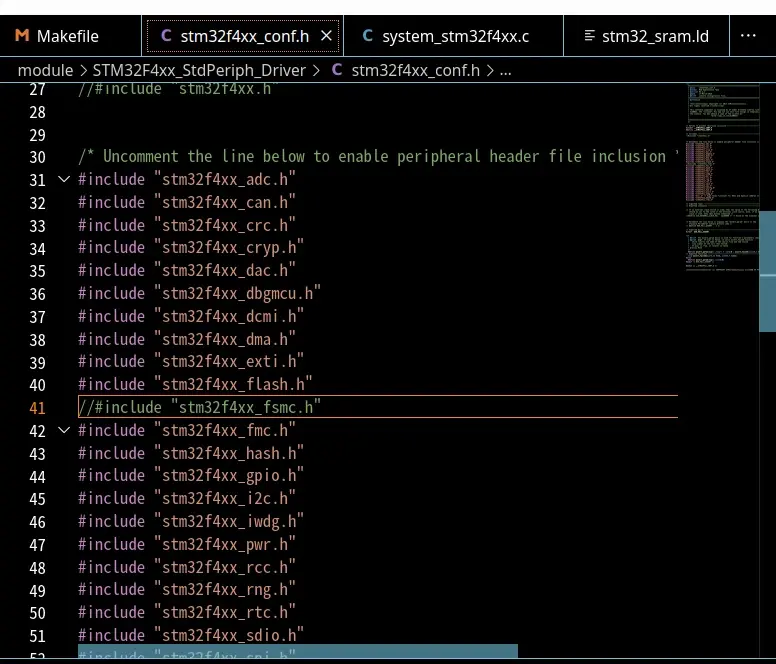
2,在固件库中删掉stm32f4xx_fsmc.c,因为会和stm32f4xx_fmc.h发生冲突
3,在stm32f4xx_conf.h,注释掉以下内容:
修改完成后,开始编译
make # 开始编译
make clean # 清理中间文件
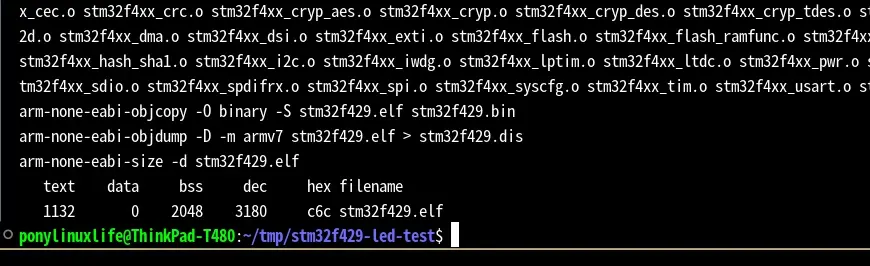
编译成功后,输出结果如下,有程序ROM/RAM占用大小:
接下来是烧录程序:
UI界面操作:
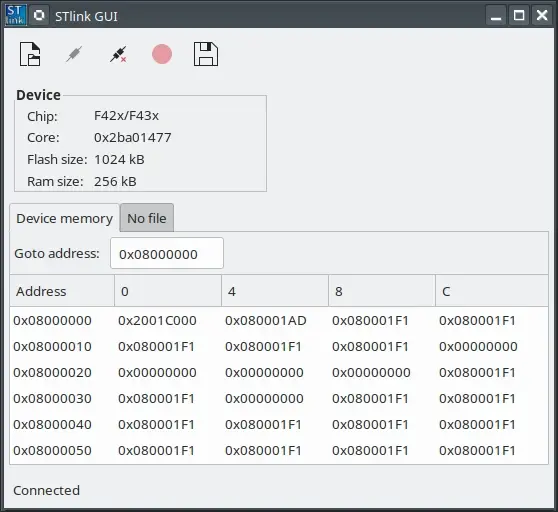
按钮从左到右分别是打开,连接,断开,烧录,保存
连接好开发板和ST-link,再点击连接,会显示芯片型号和ROM/RAM大小,
等待rom自动读取完成后,打开要烧录的文件,然后点击烧录,会再显示烧录地址
run in ROM:0x08000000
run in RAM:0x20000000
设置完成后,点击确定,等待烧录完成即可
终端下烧录:
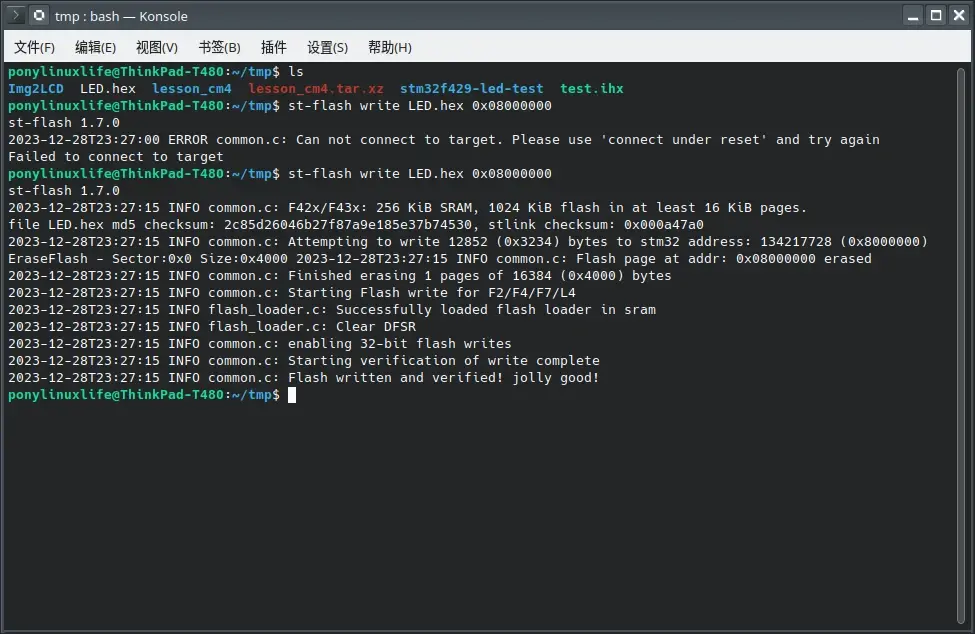
st-flash write name.bin 0x08000000 # 写入程序到0x08000000
st-flash read name.bin 0x08000000 0xff # 从0x08000000读取数据到firmware.bin
st-flash erase # 全片擦除
st-flash reset # 复位
烧录完成后,LED灯交替闪烁:
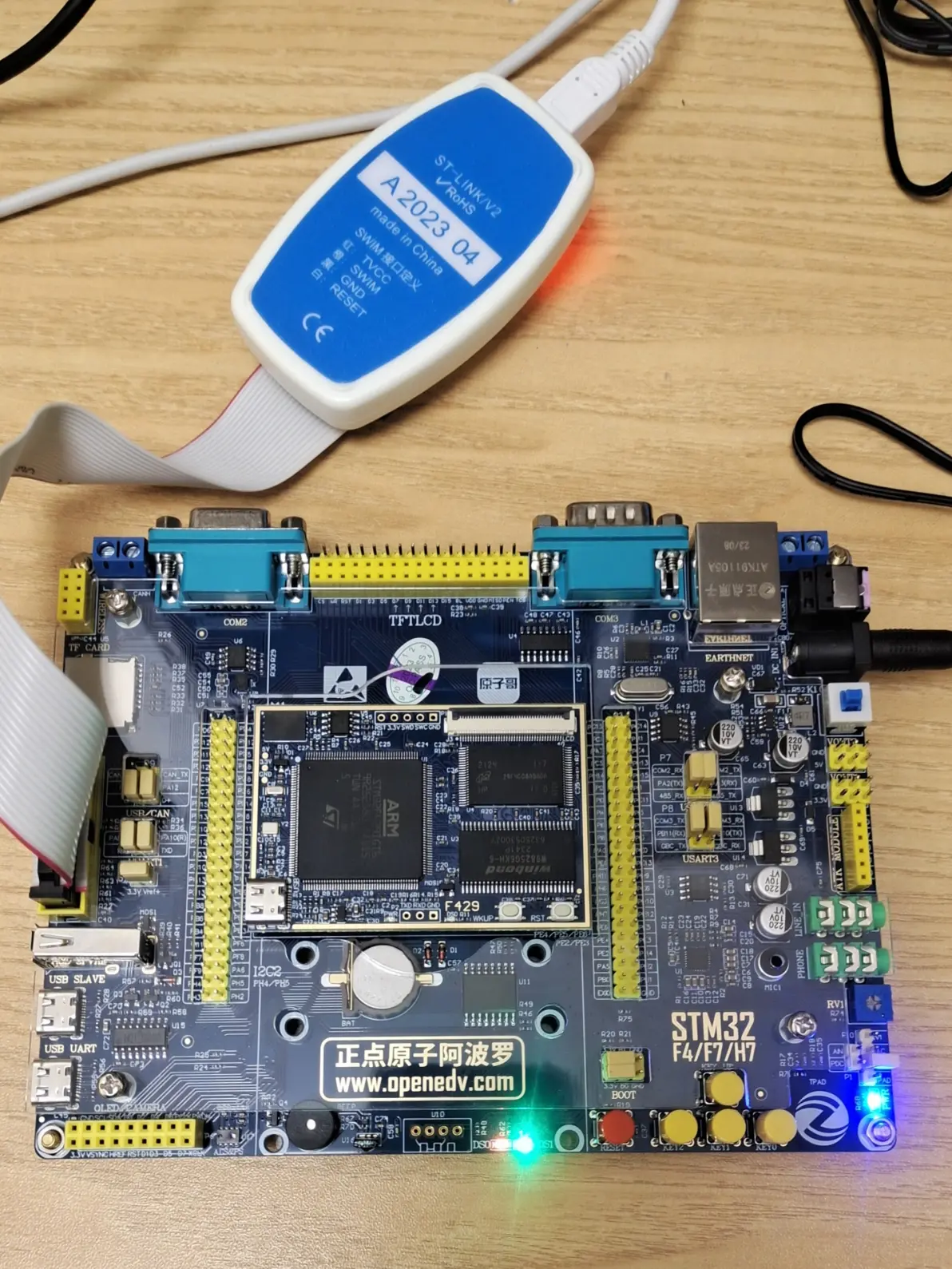
至于仿真,到现在还没有解决办法
THE END
- 意法半导体中国本地造STM32微控制器启动规模量产
- 意法半导体全新STM32C5系列,重新定义入门级微控制器性能与价值,赋能万千智能设备
- 使用 Keil Studio for Visual Studio Code开发 STM32 设备
- 基于机智云与STM32的智能拐杖安全监测系统在养老物联网中的应用
- 内置全栈安全,一站式满足CRA法案与IEC 62443标准——米尔STM32MP257核心板
- 如何用 STM32 FLASH 实现等效 100 万次擦写的 EEPROM 功能?
- 实战解析:通过一个小项目掌握STM32所有外设
- STM32学了两年半,却还是不会做项目
- 意法半导体推出最新STM32MP21微处理器,兼具高性价比、低功耗、高灵活性
- 基于STM32的矿井作业环境监测系统设计与实现
- 六大全新产品系列推出,MCX A微控制器家族迎来创新
- 意法半导体全新STM32C5系列,重新定义入门级微控制器性能与价值,赋能万千智能设备
- 从控制到系统:TI利用边缘AI重塑嵌入式MCU的边界
- 模组复用与整机重测在SRRC、CCC、CTA/NAL认证中的实践操作指南
- 有源晶振与无源晶振的六大区别详解
- 英飞凌持续巩固全球微控制器市场领导地位
- 使用 Keil Studio for Visual Studio Code开发 STM32 设备
- 蓝牙信道探测技术原理与开发套件实践
- LoRa、LoRaWAN、NB-IoT与4G DTU技术对比及工业无线方案选型分析
- Microchip 推出生产就绪型全栈边缘 AI 解决方案,赋能MCU和MPU实现 智能实时决策
-

【TI MSPM0 应用实战】智能小车+工业角度编码器+血氧仪+烟雾探测器!硬核参考设计详解!
-

2022 Digi-Key KOL 系列: 你见过1GHz主频的单片机吗?Teensy 4.1开发板介绍
-

TI 新一代 C2000™ 微控制器:全方位助力伺服及马达驱动应用
-

MSP430电容触摸技术 - 防水Demo演示
-

直播回放: Microchip Timberwolf™ 音频处理器在线研讨会
-

基于灵动MM32W0系列MCU的指夹血氧仪控制及OTA升级应用方案分享
-
1瓦线性调频增强器
-
12V 转 28V DC-DC 变换器(基于 LM2585)
-
红外遥控音量控制
-
LM317过压保护
-
12V转110V/220V 500W逆变器
-
DS1669数字电位器