



51单片机开发(四)--LCD1602
2025-10-15 来源:bilibili
(一)原理图
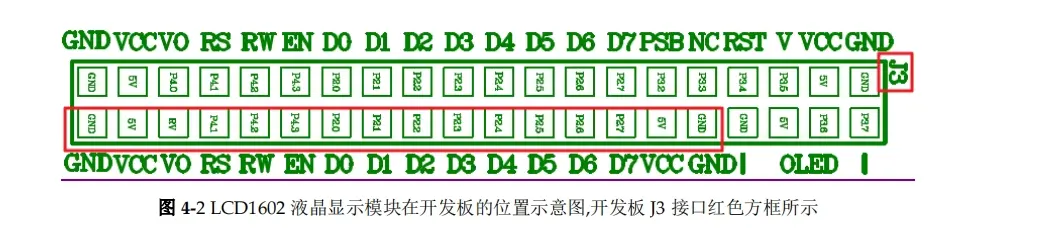
LCD1602硬件连接图
(二)时序图
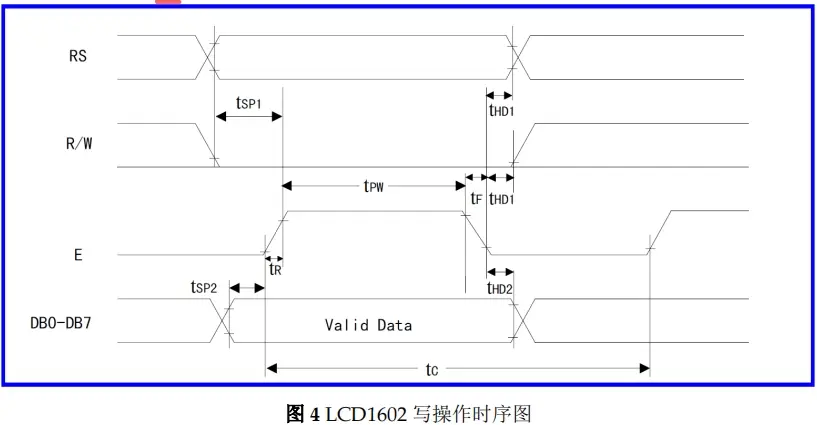
1602写操作时序
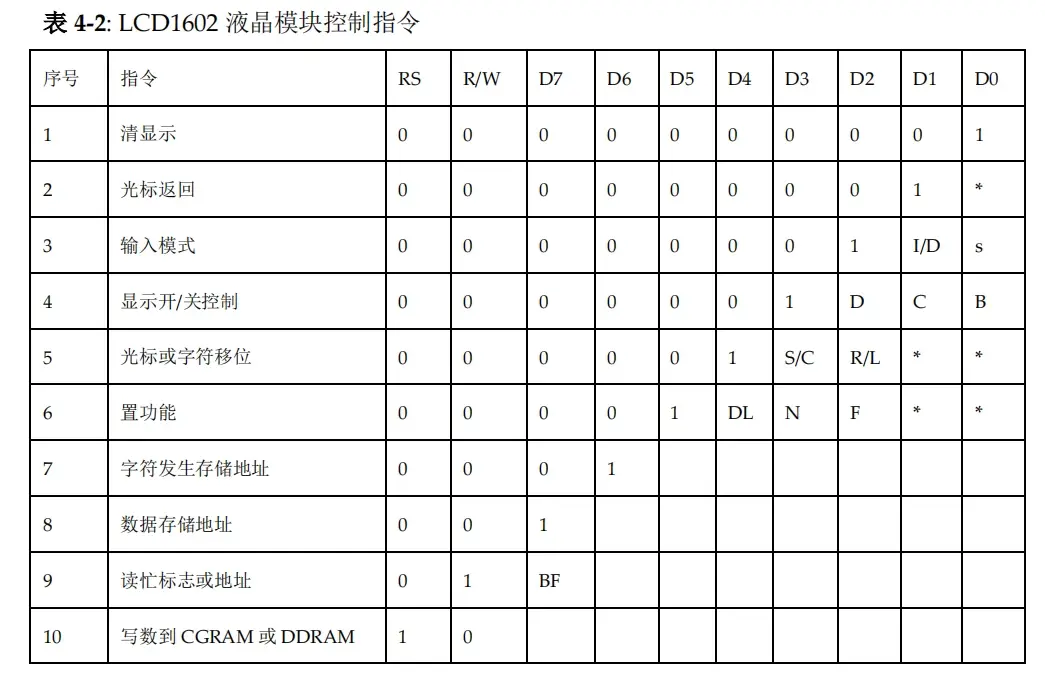
控制指令
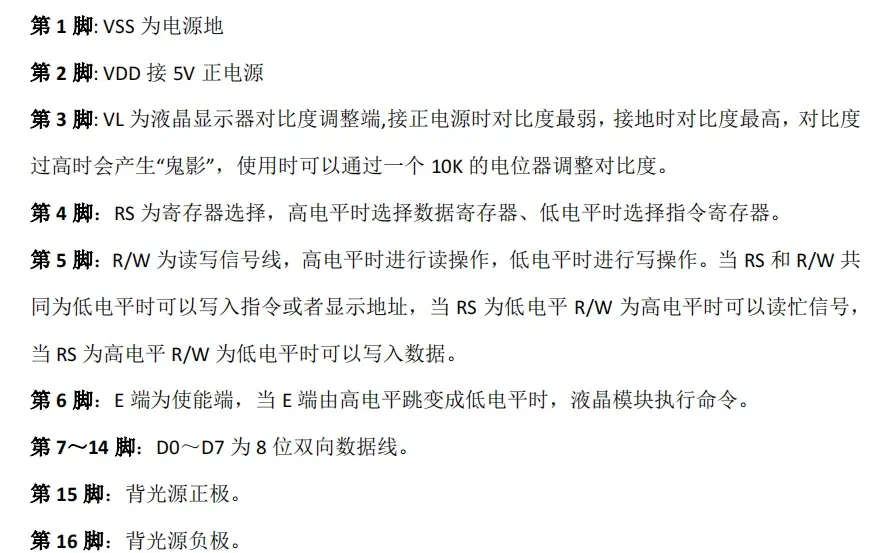
引脚说明
(三)分析
3.1根据时序图实现写命令和写数据
(1)写命令
void Lcd1602_Write_Cmd(uint8 cmd) {
Lcd1602_Busy_Check();
LCD1602_RS_SET_LOW;
LCD1602_RW_SET_LOW;
LCD1602_EN_SET_LOW;
if (cmd & 0x80)LCD1602_D7_SET_HIGH;
else LCD1602_D7_SET_LOW;
if (cmd & 0x40)LCD1602_D6_SET_HIGH;
else LCD1602_D6_SET_LOW;
if (cmd & 0x20)LCD1602_D5_SET_HIGH;
else LCD1602_D5_SET_LOW;
if (cmd & 0x10)LCD1602_D4_SET_HIGH;
else LCD1602_D4_SET_LOW;
if (cmd & 0x08)LCD1602_D3_SET_HIGH;
else LCD1602_D3_SET_LOW;
if (cmd & 0x04)LCD1602_D2_SET_HIGH;
else LCD1602_D2_SET_LOW;
if (cmd & 0x02)LCD1602_D1_SET_HIGH;
else LCD1602_D1_SET_LOW;
if (cmd & 0x01)LCD1602_D0_SET_HIGH;
else LCD1602_D0_SET_LOW;
DELAY_1US;
LCD1602_EN_SET_HIGH;
DELAY_1US;
LCD1602_EN_SET_LOW;
DELAY_2US;
}
(2)写数据
void Lcd1602_Write_Data(uint8 Data) {
Lcd1602_Busy_Check();
LCD1602_RS_SET_HIGH;
LCD1602_RW_SET_LOW;
LCD1602_EN_SET_LOW;
if (Data & 0x80)LCD1602_D7_SET_HIGH;
else LCD1602_D7_SET_LOW;
if (Data & 0x40)LCD1602_D6_SET_HIGH;
else LCD1602_D6_SET_LOW;
if (Data & 0x20)LCD1602_D5_SET_HIGH;
else LCD1602_D5_SET_LOW;
if (Data & 0x10)LCD1602_D4_SET_HIGH;
else LCD1602_D4_SET_LOW;
if (Data & 0x08)LCD1602_D3_SET_HIGH;
else LCD1602_D3_SET_LOW;
if (Data & 0x04)LCD1602_D2_SET_HIGH;
else LCD1602_D2_SET_LOW;
if (Data & 0x02)LCD1602_D1_SET_HIGH;
else LCD1602_D1_SET_LOW;
if (Data & 0x01)LCD1602_D0_SET_HIGH;
else LCD1602_D0_SET_LOW;
DELAY_1US;
LCD1602_EN_SET_HIGH;
DELAY_1US;
LCD1602_EN_SET_LOW;
DELAY_1US;
DELAY_1US;
}
(3)忙信号检查
void Lcd1602_Busy_Check(void) {
uint8 tmp;
LCD1602_D7_SET_INPUT;
do {
LCD1602_RS_SET_LOW;
LCD1602_RW_SET_HIGH;
LCD1602_EN_SET_LOW;
LCD1602_EN_SET_HIGH;
DELAY_2US;
tmp = LCD1602_READ_D7_PIN;//tmp = lcdPort;
DELAY_1US;
LCD1602_EN_SET_LOW;
DELAY_1US;
} while (tmp);
}
(四)代码
4.1初始化
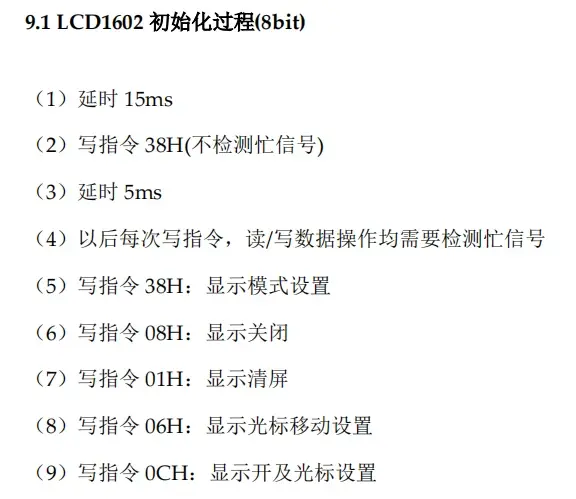
初始化描述
void Lcd1602_Init(void) {
DELAY_15MS;
Lcd1602_Write_Cmd(0x38);//写指令38H
DELAY_5MS;
Lcd1602_Write_Cmd(0x38);//显示模式设置
Lcd1602_Write_Cmd(0x08);//显示关闭
Lcd1602_Write_Cmd(0x01);//显示清屏
Lcd1602_Write_Cmd(0x06);//显示光标移动设置
Lcd1602_Write_Cmd(0x0c);//显示开及光标设置
}
4.2写字符/字符串
(1)位置关系
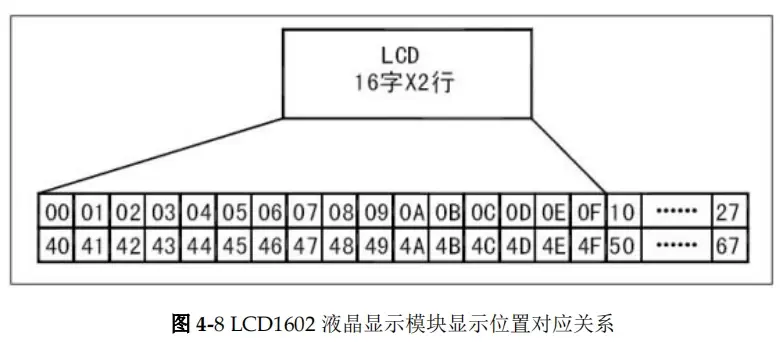
显示位置对应关系
从以上可以看到,00-0F对应第一行的16个格,40-4F对应第二行的16个格。
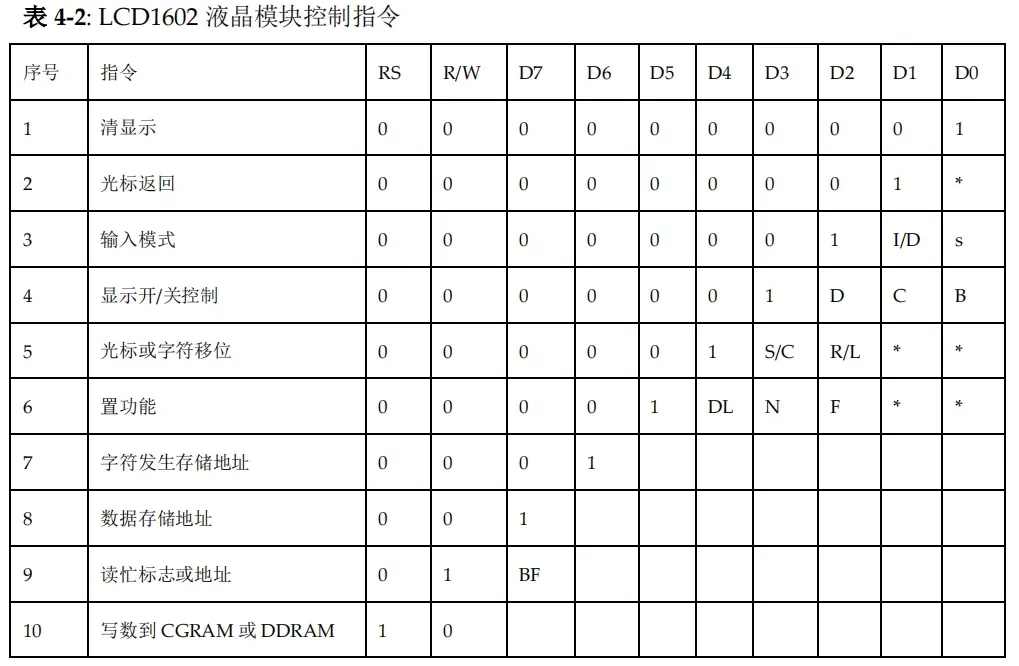
控制指令
从以上可以看到,数据存储地址D7已经被写死为1,因此,指令与位置的对应关系应该为第一行为0x00+0x80对应的1行1列,第二行为0x40+0x80对应的2行1列,
(2)字库表
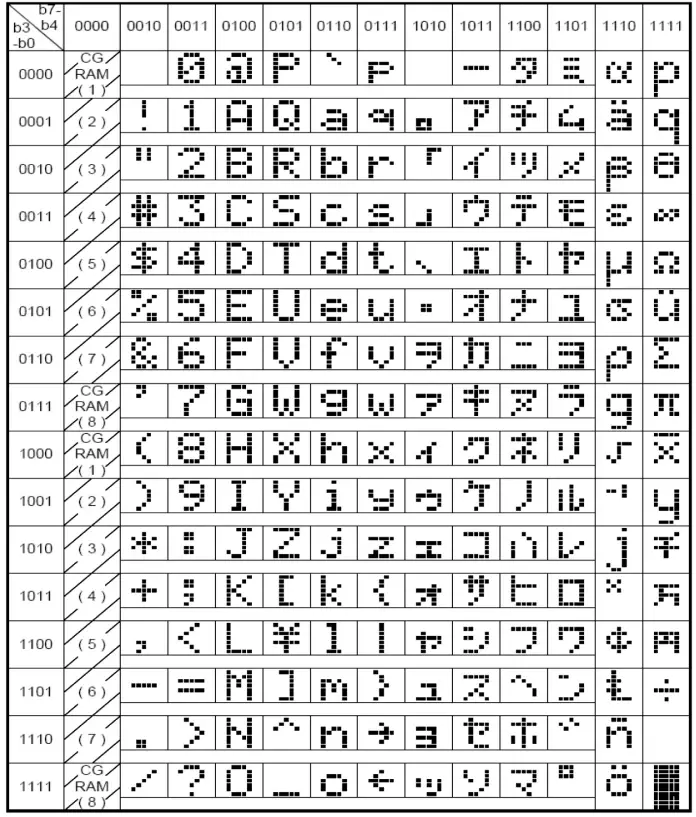
1602字库表
(3)代码实现
/******************************************************************************/
// 函数名称:Lcd1602_Show_String
// 输入参数:row-行 col-列 *str-字符
// 输出参数:无
// 函数功能:LCD1602显示字符
/******************************************************************************/
void Lcd1602_Show_String(uint8 row, uint8 col, uint8* str) {
uint8* defaultValue = 'parameter error';
switch (row) {
case 1:
Lcd1602_Write_Cmd(0x00 + 0x80 + col - 1);//第一行第y个空格
while (*str != '') {
Lcd1602_Write_Data(*str);
str++;
}
break;
case 2:
Lcd1602_Write_Cmd(0x40 + 0x80 + col - 1);//第二行第y个空格
while (*str != '') {
Lcd1602_Write_Data(*str);
str++;
}
break;
default:
Lcd1602_Write_Cmd(0x00 + 0x80);//parameter error
while (*defaultValue != '') {
Lcd1602_Write_Data(*defaultValue);
defaultValue++;
}
}
}
4.3自定义字符串
(1)取模
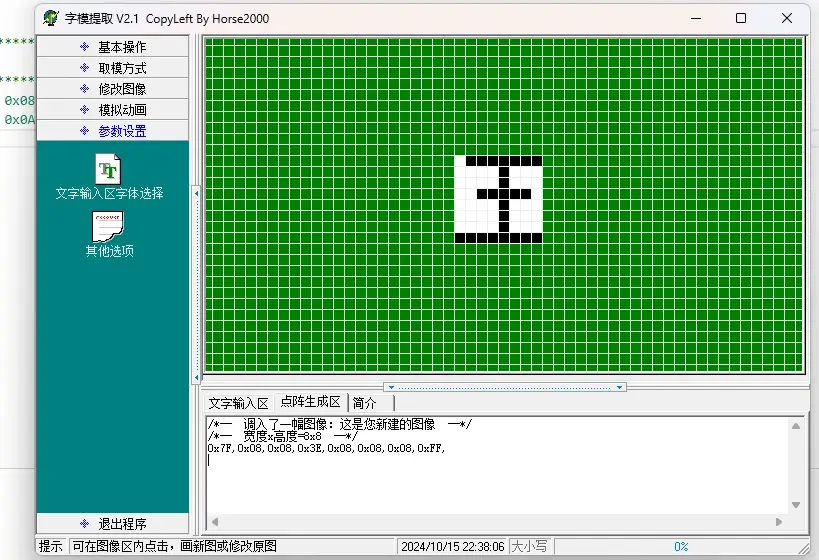
取字模
uint8 code lcd1602Table1[8] = { 0x3E, 0x08, 0x08, 0x1C, 0x08, 0x08, 0x08, 0x7F };//构造汉字“王”
uint8 code lcd1602Table2[8] = { 0x1F, 0x08, 0x08, 0x1E, 0x0A, 0x0A, 0x0A, 0x1F };//构造汉字“五”
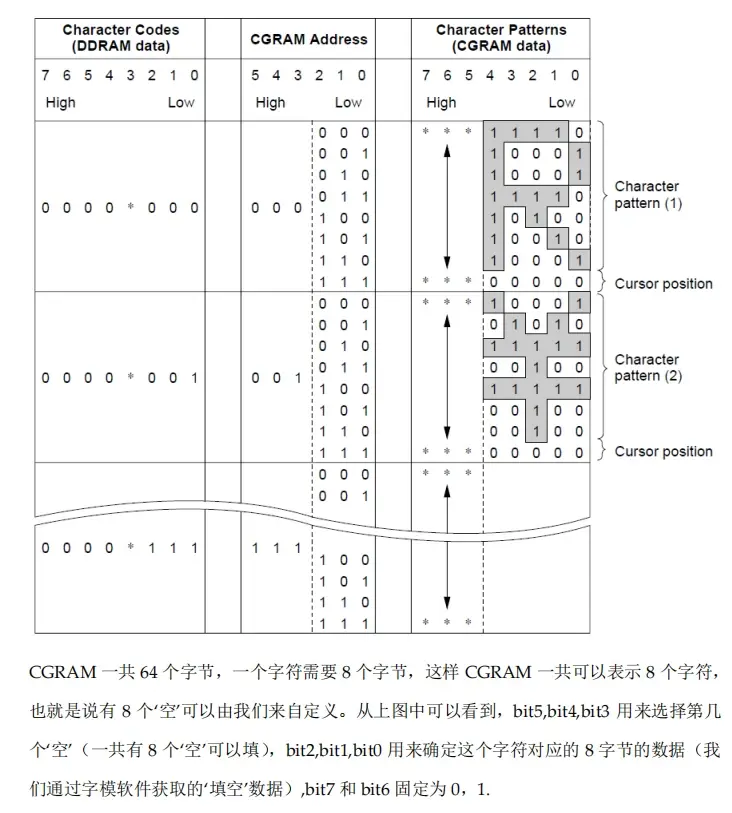
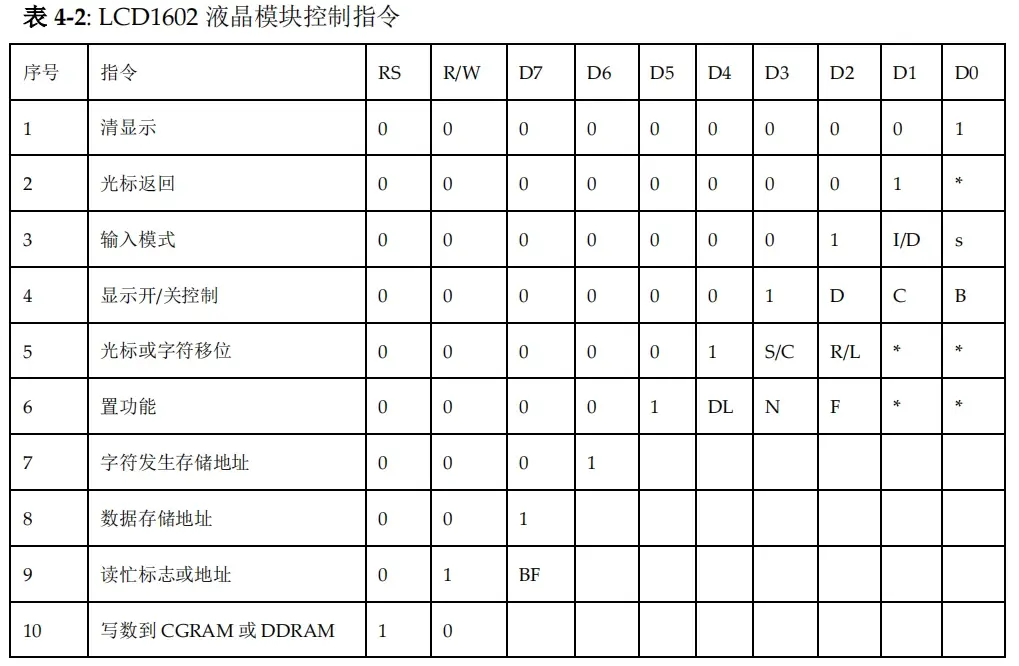 (2)实现步骤
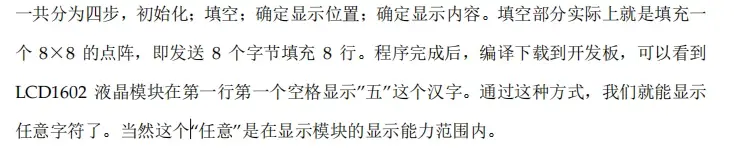 (3)代码实现
/******************************************************************************/
// 函数名称:Lcd1602_Custom_Char
// 输入参数:row-行 col-列 pos-CGRAM位置 *customValueTable-自定义字符数据
// 输出参数:无
// 函数功能:显示自定义字符
/******************************************************************************/
void Lcd1602_Custom_Char(uint8 row, uint8 col, uint8 pos, uint8* customValueTable) {
uint8 i = 0;
for (i = 0; i < 8; i++) {
Lcd1602_Write_Cmd(0x40 + pos * 8 + i);
Lcd1602_Write_Data(*(customValueTable + i));
}
if (row == 1) {
Lcd1602_Write_Cmd(0x00 + 0x80 + col - 1);
Lcd1602_Write_Data(0x00 + pos);
}
else {
Lcd1602_Write_Cmd(0x40 + 0x80 + col - 1);
Lcd1602_Write_Data(0x00 + pos);
}
}
- 六大全新产品系列推出,MCX A微控制器家族迎来创新
- 意法半导体全新STM32C5系列,重新定义入门级微控制器性能与价值,赋能万千智能设备
- 模组复用与整机重测在SRRC、CCC、CTA/NAL认证中的实践操作指南
- 有源晶振与无源晶振的六大区别详解
- 从控制到系统:TI利用边缘AI重塑嵌入式MCU的边界
- 英飞凌持续巩固全球微控制器市场领导地位
- 使用 Keil Studio for Visual Studio Code开发 STM32 设备
- 蓝牙信道探测技术原理与开发套件实践
- Microchip 推出生产就绪型全栈边缘 AI 解决方案,赋能MCU和MPU实现 智能实时决策
- LoRa、LoRaWAN、NB-IoT与4G DTU技术对比及工业无线方案选型分析
-

【TI MSPM0 应用实战】智能小车+工业角度编码器+血氧仪+烟雾探测器!硬核参考设计详解!
-

2022 Digi-Key KOL 系列: 你见过1GHz主频的单片机吗?Teensy 4.1开发板介绍
-

TI 新一代 C2000™ 微控制器:全方位助力伺服及马达驱动应用
-

MSP430电容触摸技术 - 防水Demo演示
-

直播回放: Microchip Timberwolf™ 音频处理器在线研讨会
-

基于灵动MM32W0系列MCU的指夹血氧仪控制及OTA升级应用方案分享
-
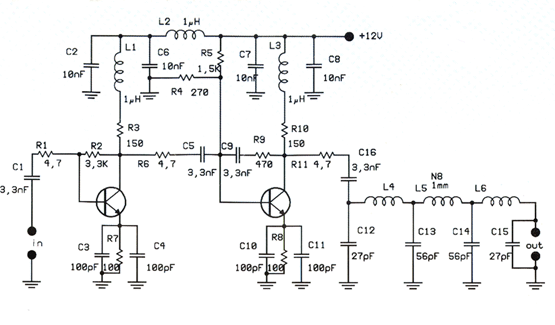
1瓦线性调频增强器
-
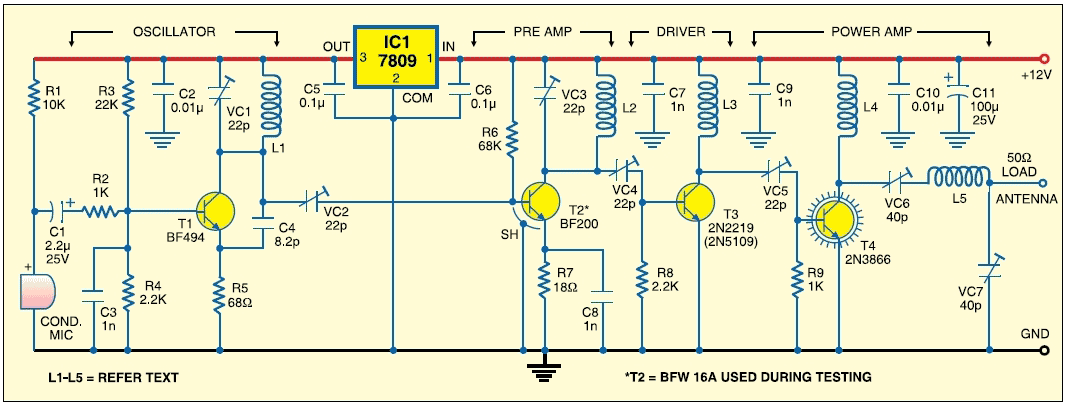
1瓦四级调频发射机
-
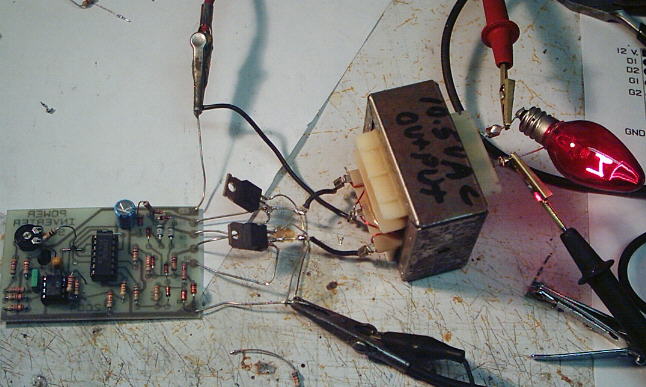
500W MOS场效应管电源逆变器,12V转110V/220V
-
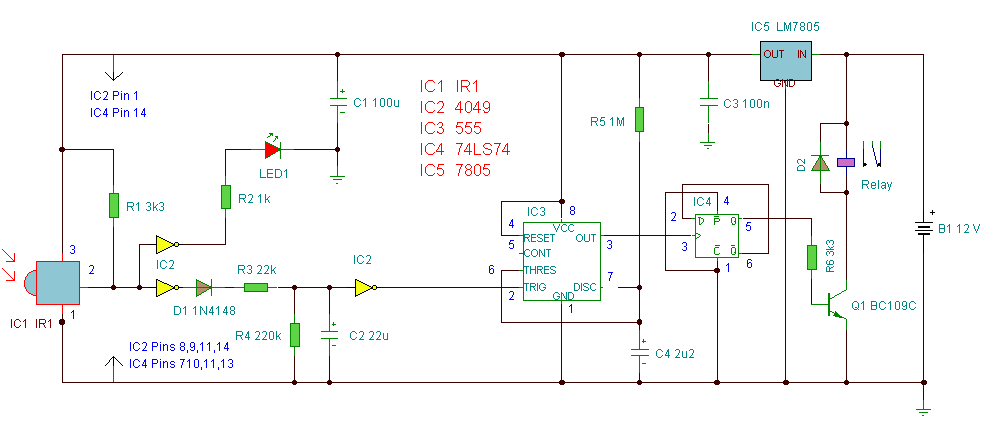
红外开关
-
LM317过压保护
-
0-30V/20A 大功率稳压电源(采用LM338)